When to do it
- You've moved into a house: the previous owners may still have remotes that open your garage
- A remote was lost or stolen
- A remote stopped working and re-programming it didn't help
How to reset a Chamberlain or LiftMaster opener: erase every remote and keypad
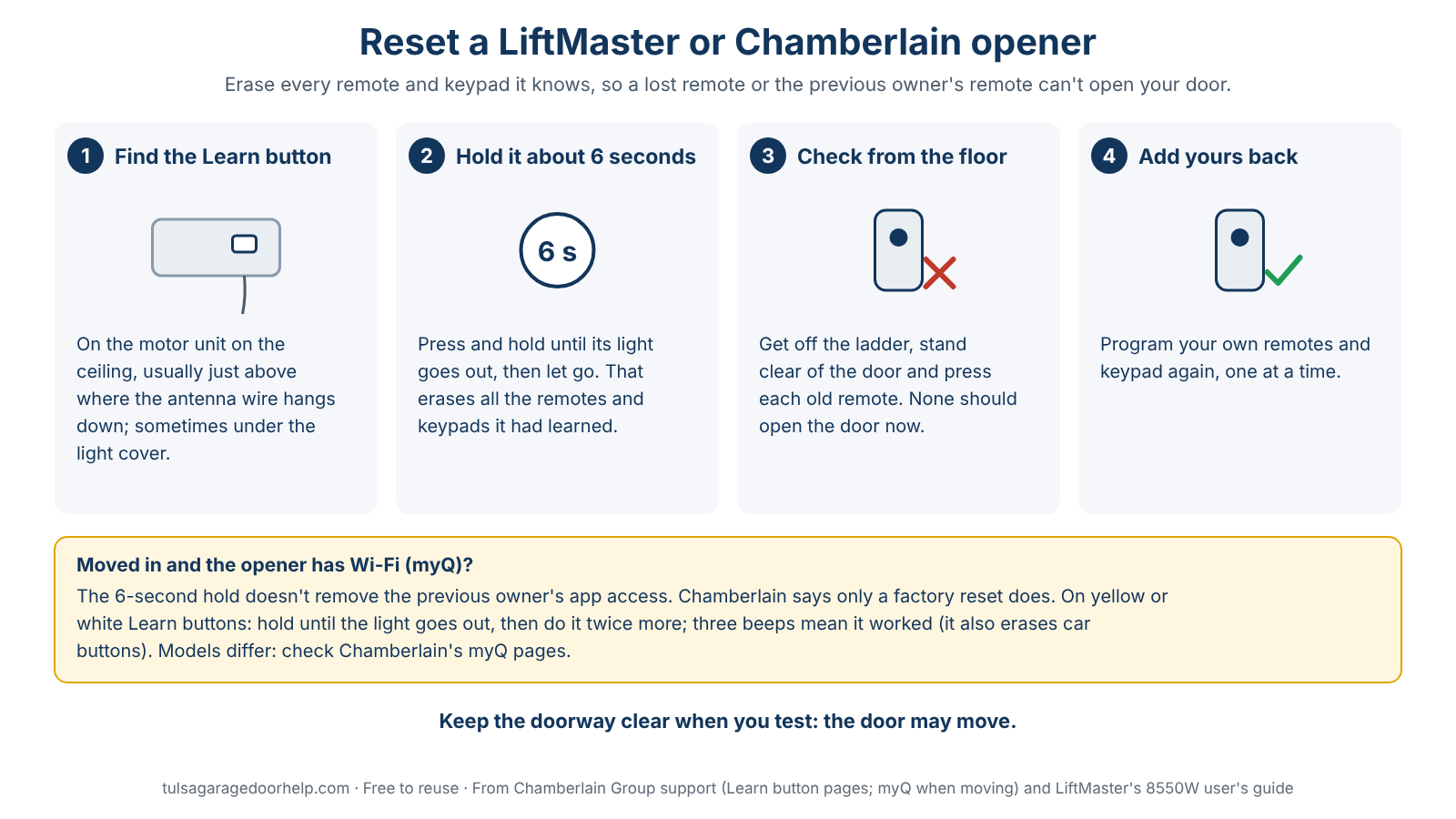
- Find the Learn button on the motor unit on the ceiling, usually just above where the antenna wire hangs down, sometimes under the light cover (Chamberlain Group support: How to find the Learn button).
- Press and hold it for about 6 seconds, until its light goes out, then let go (Chamberlain Group support: functions of the Learn/Program button; LiftMaster 8550W/8557W user's guide 114A5013, 2017 (FCC copy)). That erases all the remotes and keypads it had learned.
- Check it worked: get off the ladder, stand clear of the door and press each old remote. None should open the door now.
On models with a yellow Learn button and myQ, there are extra hold patterns for erasing myQ accessories or resetting Wi-Fi; Chamberlain lists them on the same page (Chamberlain Group support: functions of the Learn/Program button). For a plain reset of remotes, the single 6-second hold is the one you want. Just moved in and the opener has Wi-Fi (myQ)? The previous owners may still have it in their myQ app. The 6-second hold doesn't cover that. Chamberlain says a Wi-Fi reset does not remove the previous owner's account; only a factory reset does (Chamberlain: what to do with a myQ device when moving). On openers with a yellow or white Learn button, hold the Learn button until its light goes out, then straight away do the same twice more; three beeps mean it worked. That also erases every remote, keypad and car button. Then add the opener to your own myQ account (LiftMaster 8550W/8557W user's guide 114A5013, 2017 (FCC copy)). Models differ, so check Chamberlain's myQ support pages for yours.
Reset a keypad when you don't know the code
You don't need the old code. Keep the doorway clear: the door may move when you test the new code. On Chamberlain and LiftMaster keypads such as the 877LM and 940LM (Chamberlain Group support: how to add, program or change a keyless entry PIN):
- Press and release the opener's Learn button. Within 30 seconds, enter a new 4-digit code on the keypad and hold ENTER until the opener's light blinks
- Or, if your wall control has a LEARN button, press it twice, then enter the new code and press ENTER
Keypads 940EV and 877MAX use a different sequence that depends on the Learn button's color (Chamberlain Group support: program or change the PIN for keypad models 940EV and 877MAX). Both, step by step: change your keypad code, with or without the old one. Setting a new code this way may not stop an old one working. Just moved in? Do the 6-second erase above first, then set your code and add your remotes back.
Then add your remotes and keypad back
Program each remote again with the Learn button (make sure the doorway is clear: the door may move): press and release it, then within 30 seconds hold the remote button until the opener lights flash or you hear two clicks (Chamberlain Group support: How to program a remote control; LiftMaster 8550W/8557W user's guide 114A5013, 2017 (FCC copy)). Step by step: how to program a garage door opener remote. The keypad needs its PIN set again too, and so do the car's built-in buttons: program your opener to your car.
Good to know
- Openers hold a limited number of remotes and keypads. When the memory is full and you add one more, the opener drops the oldest one automatically (Chamberlain Group support: what happens when the remote/keypad memory is full)
- This erases remotes and keypads only. Travel (how far the door moves) is set separately. If the door looks sound (springs and cables intact, door straight, moving smoothly), you can reset travel by your own opener's manual, or have a technician do it, then run the 2x4 test. Never raise the force setting to push through a problem. See "Door touches the floor, then goes back up" in our sensors guide
- Craftsman openers are made by Chamberlain Group and erase the same way: see how to program a Craftsman opener
- Other brands work differently: Genie, for example, has different steps for Intellicode 1 and Intellicode 2 openers (Genie: 3-Button Genie Master remote programming instructions). See how to program and erase a Genie opener
- Only want to change the keypad code? See change your keypad code
- Opener beeping, rather than ignoring remotes? That's usually the backup battery: what the beeps mean
Getting a repair quote? Compare it with typical prices, with their sources, or put it into the free quote checker.
Sources
- Chamberlain Group support: How to find the Learn button
- Chamberlain Group support: functions of the Learn/Program button
- Chamberlain Group support: myQ device ownership when moving (a Wi-Fi reset doesn't remove the previous owner; only a factory reset does; read Nov 16, 2026)
- Chamberlain Group support: what happens when the remote/keypad memory is full
- Chamberlain Group support: How to program a remote control
- Chamberlain Group support: how to add, program or change a keyless entry PIN
- Chamberlain Group support: program or change the PIN for keypad models 940EV and 877MAX
- LiftMaster 8550W/8557W user's guide 114A5013, 2017 (FCC copy)
- Genie: 3-Button Genie Master remote programming instructions