
Which remote works with my garage door opener?

Find the Learn button on the motor unit on your ceiling. Its color tells you which remotes and keypads work.

The Learn button is usually just above where the antenna wire hangs down from the motor unit, and sometimes under the light cover (Chamberlain Group support: How to find the Learn button). Look from the floor if you can; don't climb on anything unsteady.

1. Who made your opener?

2. What color is the Learn button?

No Learn button?

Some older openers use small code switches instead; Genie's instructions, for example, cover older code-switch openers separately (Genie: 3-Button Genie Master remote programming instructions). Openers made before 1993 may also lack the external safety device, such as the sensors near the floor, that federal rules have required on openers made since January 1, 1993 (CPSC news release, Dec 3, 1992: final rules for automatic garage door openers made on or after Jan 1, 1993). If yours has none, a new opener is worth considering before a new remote.

Sources

Program a garage door remote · Remote or keypad not working

Diagram: Where's the model number on a LiftMaster or Chamberlain opener?
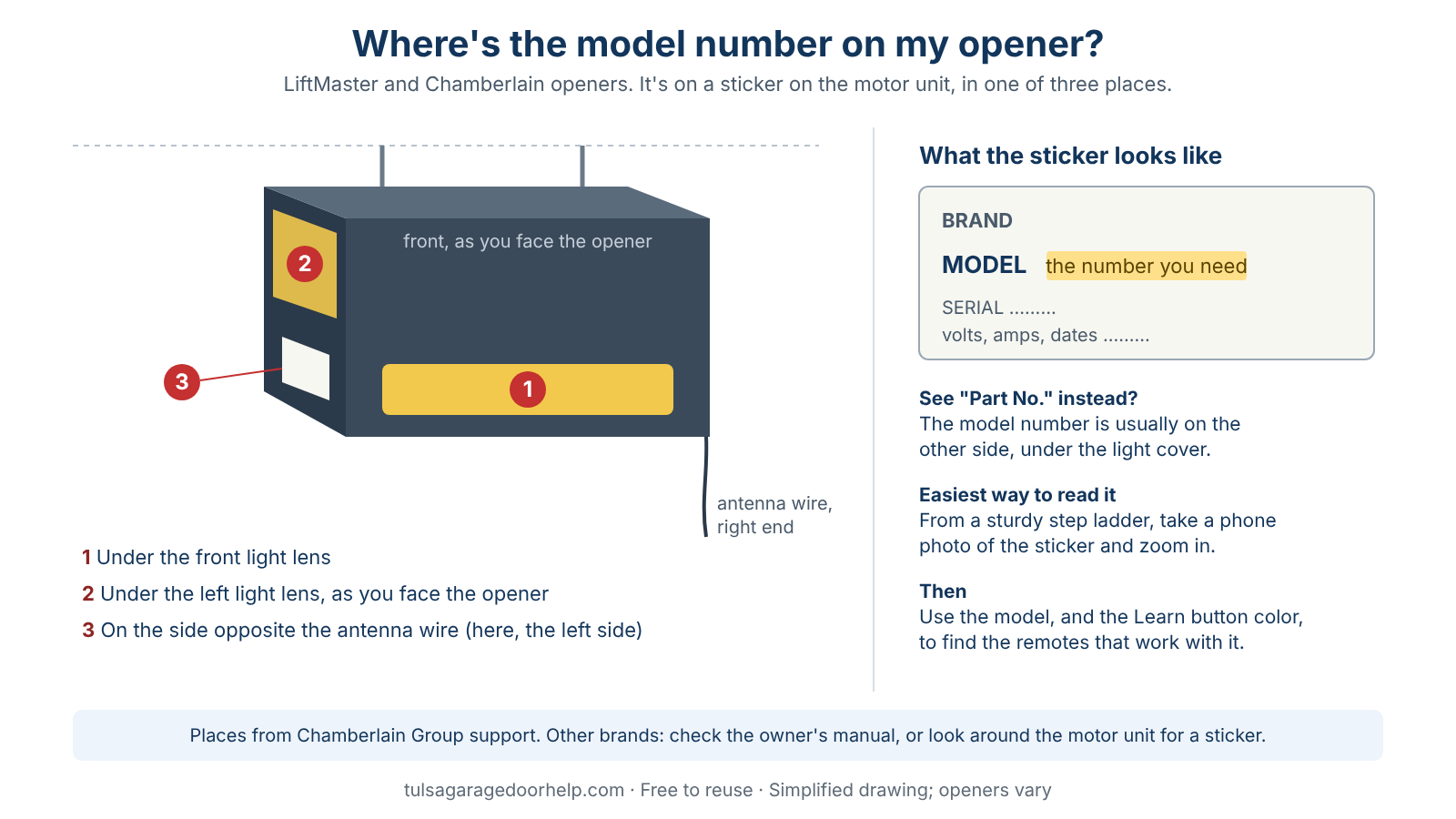
Labeled diagram of an opener motor unit seen from the front and left side, with three numbered places for the model sticker: under the front light lens; under the left light lens, as you face the opener; and on the side opposite the antenna wire. A sample sticker shows where the model number is printed. If the sticker shows a part number instead, the model number is usually on the other side, under the light cover.Labeled diagram of an opener motor unit seen from the front and left side, with three numbered places for the model sticker: under the front light lens; under the left light lens, as you face the opener; and on the side opposite the antenna wire. A sample sticker shows where the model number is printed. If the sticker shows a part number instead, the model number is usually on the other side, under the light cover.
Three places to look on LiftMaster and Chamberlain openers. A phone photo from a sturdy step ladder is the easiest way to read it. Sources: Chamberlain Group support: find your model number. Free to reuse; please credit us: how to use our diagrams.

Diagram: Program a LiftMaster or Chamberlain remote in three steps
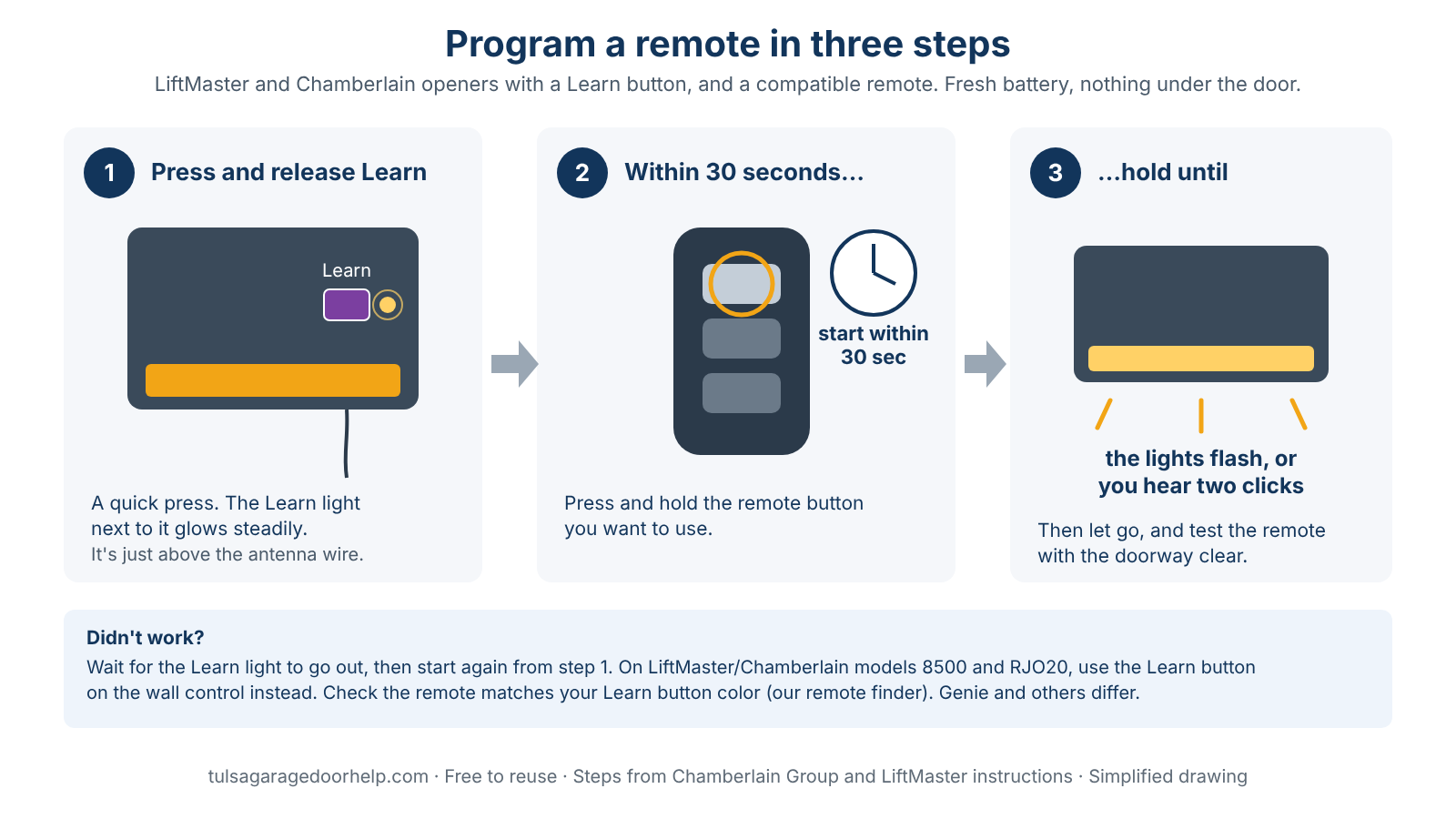
Labeled diagram in three steps. One: press and immediately release the Learn button on the opener's motor unit; the Learn light glows steadily. Two: within 30 seconds, press and hold the remote button you want to use. Three: keep holding until the opener lights flash or you hear two clicks, then let go and test it with the doorway clear. If it didn't work, wait for the Learn light to go out and start again; on models 8500 and RJO20, use the Learn button on the wall control instead.Labeled diagram in three steps. One: press and immediately release the Learn button on the opener's motor unit; the Learn light glows steadily. Two: within 30 seconds, press and hold the remote button you want to use. Three: keep holding until the opener lights flash or you hear two clicks, then let go and test it with the doorway clear. If it didn't work, wait for the Learn light to go out and start again; on models 8500 and RJO20, use the Learn button on the wall control instead.
For openers with a Learn button and a compatible remote: check yours with the remote finder. Put a fresh battery in the remote first, and keep the doorway clear: the door may move. Genie and other brands work differently. Sources: Chamberlain Group support: How to find the Learn button; Chamberlain Group support: How to program a remote control. Free to reuse; please credit us: how to use our diagrams.

Diagram: Which LiftMaster or Chamberlain remote fits? Learn button colors
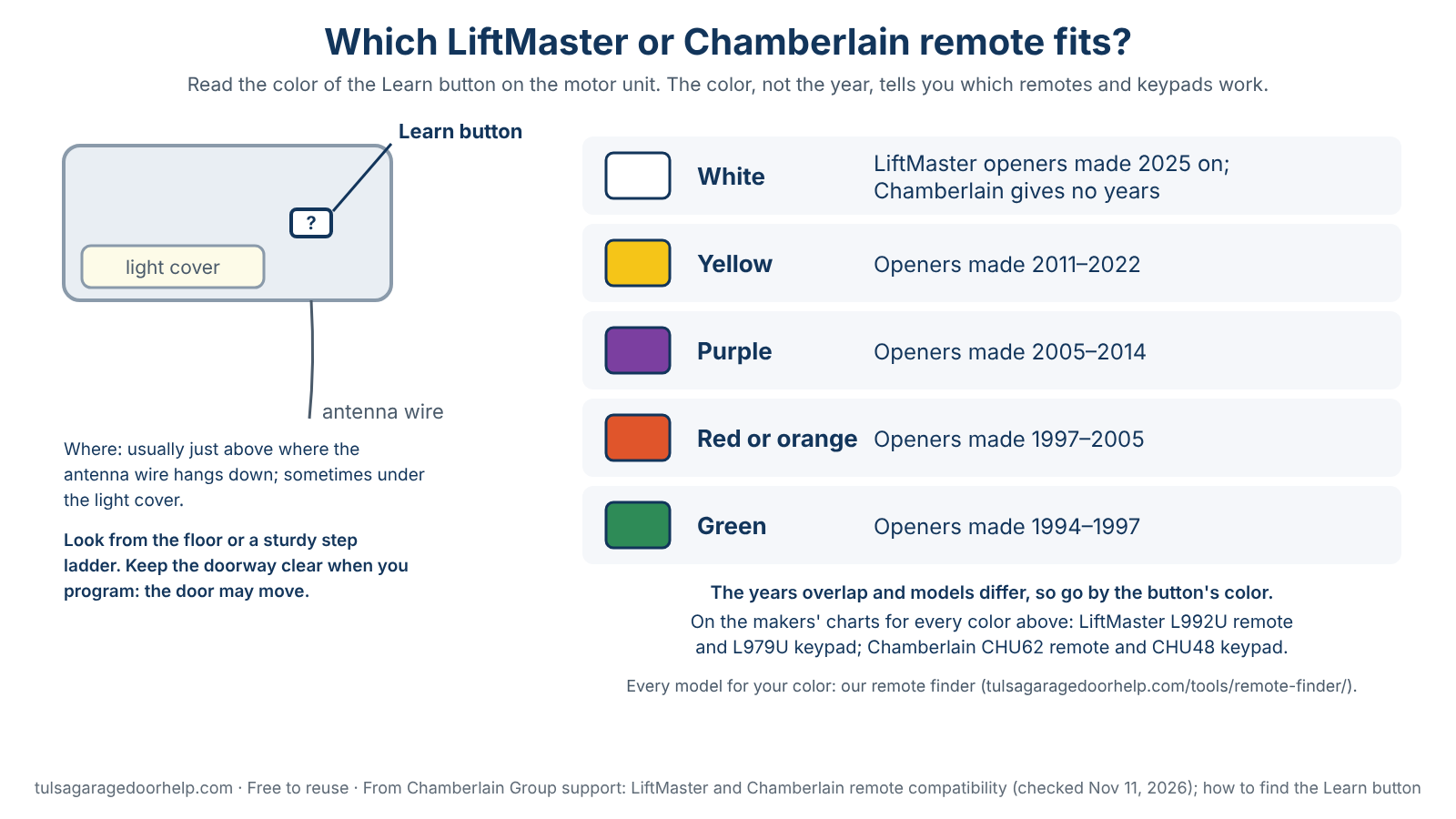
Chart of LiftMaster and Chamberlain Learn button colors and the years of the openers that use them: white, LiftMaster openers made 2025 on (Chamberlain gives no years); yellow, openers made 2011–2022; purple, openers made 2005–2014; red or orange, openers made 1997–2005; green, openers made 1994–1997. A simple motor unit drawing shows the Learn button just above the hanging antenna wire, with the light cover beside it. Where: usually just above where the antenna wire hangs down; sometimes under the light cover. The years overlap and models differ, so go by the button's color. On the makers' charts for every color above: LiftMaster L992U remote and L979U keypad; Chamberlain CHU62 remote and CHU48 keypad. Look from the floor or a sturdy step ladder. Keep the doorway clear when you program: the door may move.Chart of LiftMaster and Chamberlain Learn button colors and the years of the openers that use them: white, LiftMaster openers made 2025 on (Chamberlain gives no years); yellow, openers made 2011–2022; purple, openers made 2005–2014; red or orange, openers made 1997–2005; green, openers made 1994–1997. A simple motor unit drawing shows the Learn button just above the hanging antenna wire, with the light cover beside it. Where: usually just above where the antenna wire hangs down; sometimes under the light cover. The years overlap and models differ, so go by the button's color. On the makers' charts for every color above: LiftMaster L992U remote and L979U keypad; Chamberlain CHU62 remote and CHU48 keypad. Look from the floor or a sturdy step ladder. Keep the doorway clear when you program: the door may move.
Colors and years from the makers' compatibility charts (checked November 11, 2026); where to look is from Chamberlain Group support. Simplified drawing; where the button sits varies by model. Go by the color, not the year; every model for your color is in our remote finder. Sources: Chamberlain Group support: LiftMaster remote compatibility (checked Nov 11, 2026); Chamberlain Group support: Chamberlain remote compatibility (checked Nov 11, 2026); Chamberlain Group support: How to find the Learn button. Free to reuse; please credit us: how to use our diagrams.