First: does the wall button work?
If the button on the wall opens the door, the opener's motor and the door are working, so start with the remote or keypad. For a remote, first check the LOCK button on the wall control isn't on: Chamberlain says the opener then ignores remotes, and its lights flash twice when you press a remote button. Press and hold LOCK until its light stops flashing. If the wall button doesn't work either, skip to opener repair or try the door checker.
Keypad not working (wall button works)
Chamberlain's support steps, in order (Chamberlain Group support: wall button works but keypad doesn't):
- Replace the battery. "Most keypads use a 9-volt battery, though some older models may use a 12-volt." LiftMaster's 877LM keypad, for example, takes a 9-volt (LiftMaster 877LM keypad manual 114A3938B, 2011 (dealer-hosted copy)).
- Re-program the keypad after a battery change. If that fails, clear the opener's memory (how to reset the opener) and program the PIN again. That erases every remote, keypad and car button, so you'll add them all back.
- Try a different PIN. If a new PIN works, one of the old PIN's buttons may have failed. How to set one: change your keypad code.
- Temporary PIN? It's set to run out after a number of hours or openings, by design. Chamberlain says an expired temporary PIN will no longer open the door, but can still close it (LiftMaster 877LM keypad manual 114A3938B, 2011 (dealer-hosted copy)).
- Take it off the wall and test it. If it works in your hand, the mounting surface is interfering. Chamberlain suggests rubber grommets or a small piece of wood behind it.
Still dead after a new battery? Chamberlain says it may be a failed keypad or the opener's receiver logic board (Chamberlain Group support: wall button works but keypad doesn't). Ask which one it is before agreeing to replace the whole opener.
Re-programming a remote with the Learn button (LiftMaster and Chamberlain)
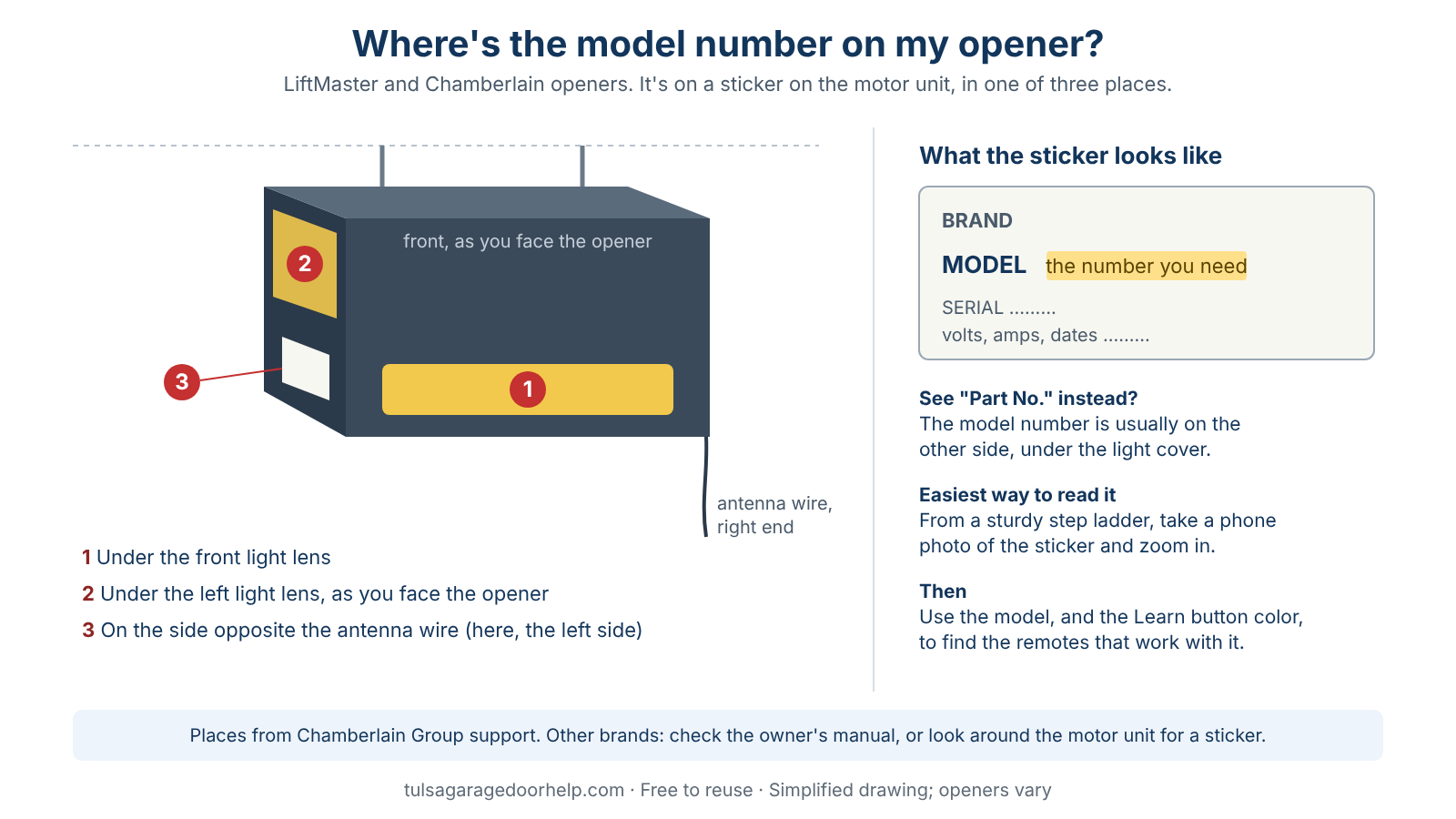
- Find the Learn button on the opener motor on the ceiling. It's usually just above where the antenna wire hangs down, sometimes under the light cover (Chamberlain Group support: How to find the Learn button). Take the remote up the ladder with you, and make sure the doorway is clear: the door may move when it works.
- Press and immediately release the Learn button. Its light should glow steadily.
- Within 30 seconds, press and hold the remote button you want to use. Let go when the opener's lights flash or you hear two clicks (LiftMaster 8550W/8557W user's guide 114A5013, 2017 (FCC copy)). Once the Learn light is on, you have about 30 seconds (Chamberlain Group support: How to program a remote control; LiftMaster 877LM keypad manual 114A3938B, 2011 (dealer-hosted copy)).
If it didn't take, wait for the Learn light to go out before trying again. The button's color (yellow, purple, red/orange or green, or white on the newest openers) tells you which type of opener you have, and so which remotes and steps fit (Chamberlain Group support: How to find the Learn button; LiftMaster 890MAX/893MAX/895MAX remote instructions 114A3930E, 2014 (retailer-hosted copy)); yellow-button models have slightly different steps for clearing accessories (Chamberlain Group support: How to find the Learn button). Chamberlain's site has a compatibility tool if you're not sure a remote fits your opener (Chamberlain Group support: How to program a remote control).
When it's not the remote
- The wall button doesn't work either: check the opener has power (the outlet, the breaker), then see opener repair
- The door starts to close then goes back up: that's usually the safety sensors near the floor, not the remote. See fixing garage door sensors; if it only happens on sunny days, the sun glare checker shows when the low sun hits your garage
- The opener hums but the door doesn't move: stop. It could be a broken spring. Read broken spring and the door won't open
- The opener beeps every 30 seconds: that's usually its backup battery, not the remote. See opener battery backup and beeping
Getting a repair quote? Compare it with typical prices, with their sources, or put it into the free quote checker.
Sources
- Chamberlain Group support: How to program a remote control
- Chamberlain Group support: How to find the Learn button
- Chamberlain Group support: wall button works but keypad doesn't
- LiftMaster 8550W/8557W user's guide 114A5013, 2017 (FCC copy)
- LiftMaster 877LM keypad manual 114A3938B, 2011 (dealer-hosted copy)
- LiftMaster 890MAX/893MAX/895MAX remote instructions 114A3930E, 2014 (retailer-hosted copy)