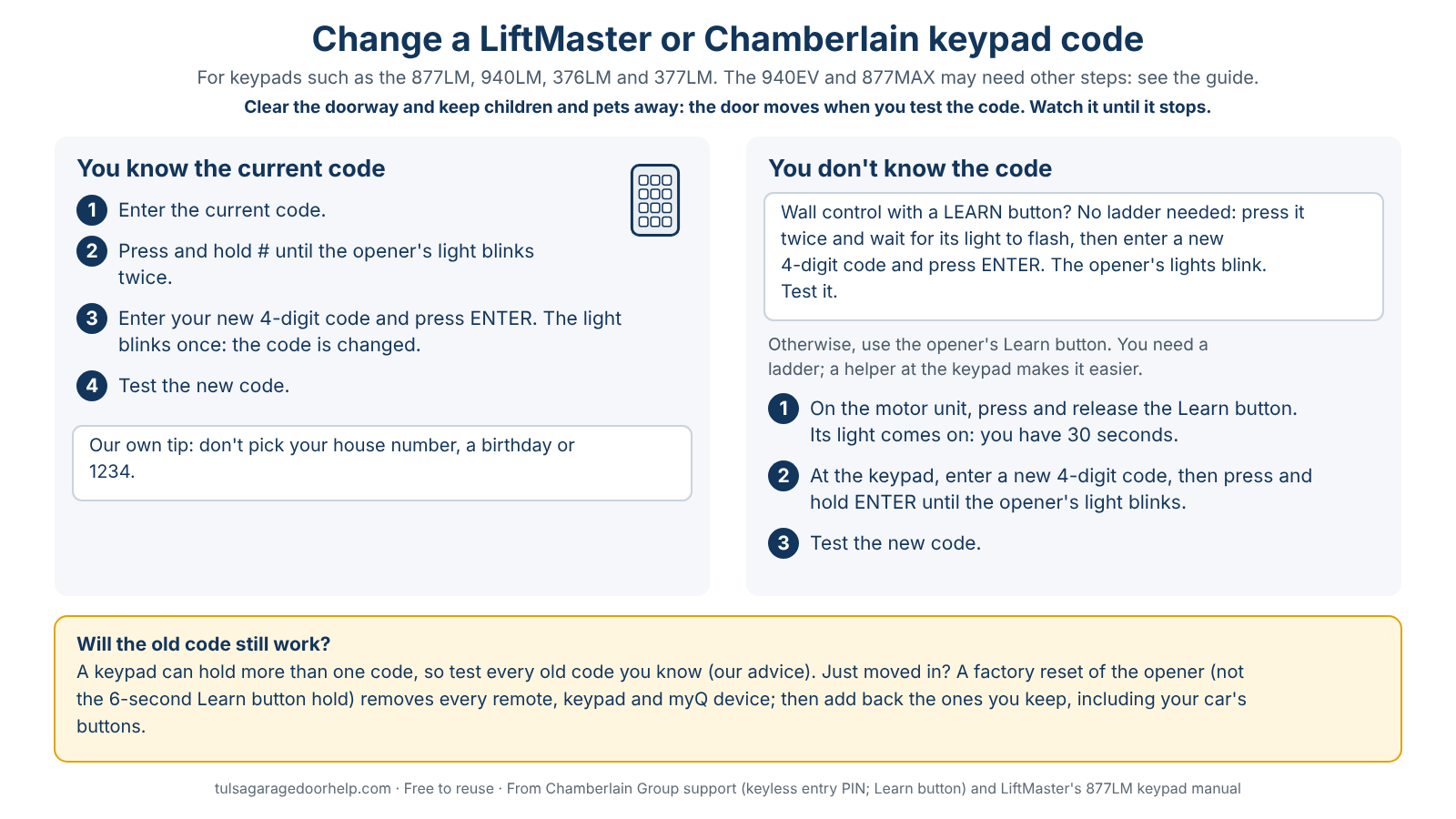
Before you start, clear the doorway: the door will move while you test the new code. Watch it until it stops, and keep children and pets clear (Chamberlain Group support: how to add, program or change a keyless entry PIN; LiftMaster 877LM keypad manual 114A3938B, 2011 (dealer-hosted copy)).
LiftMaster and Chamberlain: you know the current code
Chamberlain's steps for keypads such as the 877LM, 940LM, 376LM and 377LM (Chamberlain Group support: how to add, program or change a keyless entry PIN). They work on a 940EV or 877MAX keypad too, unless the opener's Learn button is green or you have a separate receiver: then use the 940EV and 877MAX steps in the next section (Chamberlain Group support: program or change the PIN for keypad models 940EV and 877MAX).
- Enter the current code.
- Press and hold # until the opener's light blinks twice.
- Enter your new 4-digit code and press ENTER. The light blinks once; Chamberlain says the code “is now changed” (Chamberlain Group support: how to add, program or change a keyless entry PIN).
- Test it: enter the new code and press ENTER.
LiftMaster and Chamberlain: you don't know the current code
Keypads such as the 877LM and 940LM, if your wall button panel has a LEARN button (no ladder): press LEARN twice and wait for its light to flash, then enter a new 4-digit code on the keypad and press ENTER. The opener's lights blink. Test it (Chamberlain Group support: how to add, program or change a keyless entry PIN). Not for the 940EV or 877MAX: use their steps below.
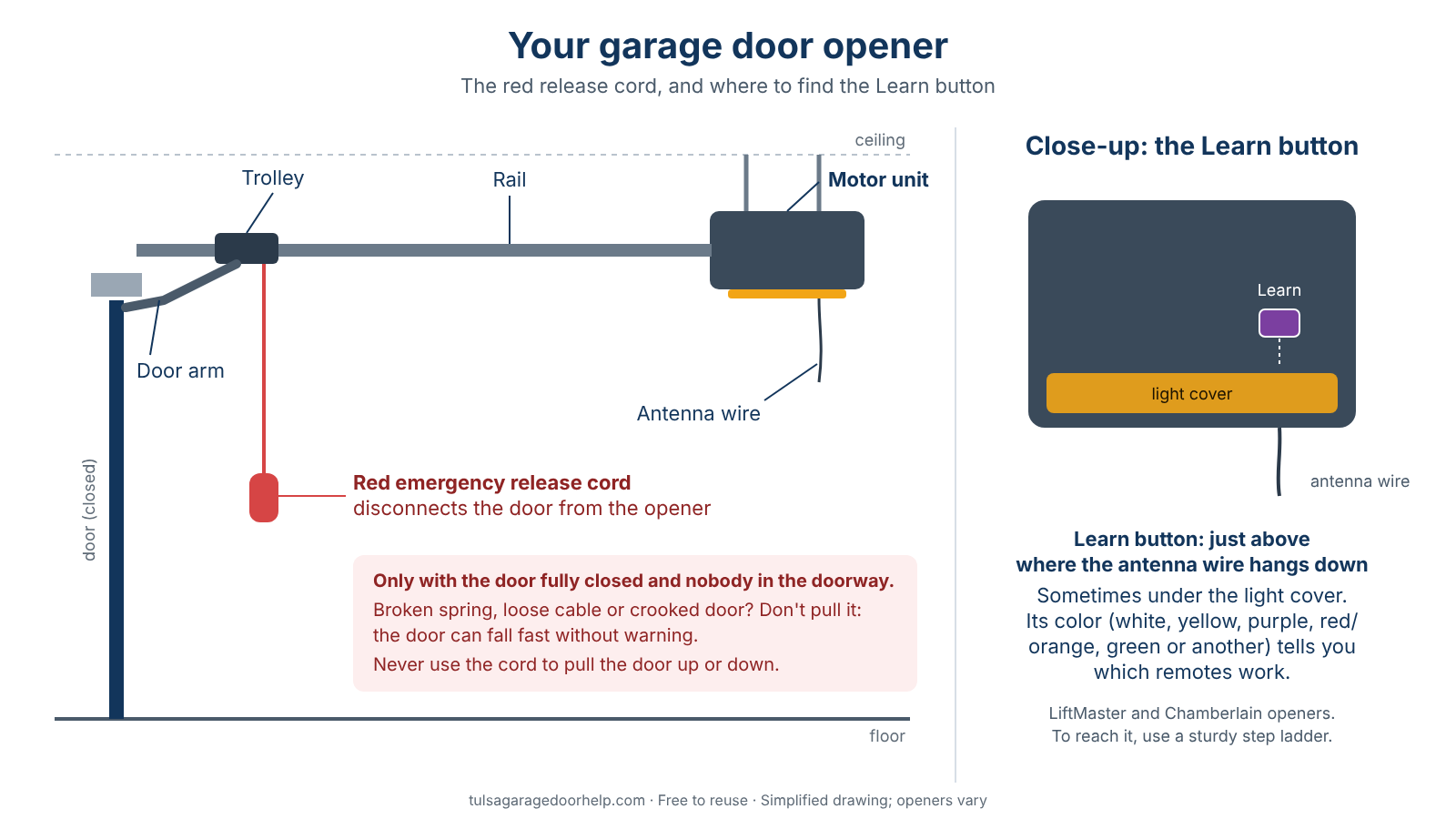
Otherwise, use the Learn button on the opener. It's on the motor unit, usually above where the antenna wire hangs, sometimes under a light cover (Chamberlain Group support: How to find the Learn button). You'll need a step ladder, and a second person at the keypad helps, because you have 30 seconds (Chamberlain Group support: how to add, program or change a keyless entry PIN).
Keypads such as the 877LM and 940LM (Chamberlain Group support: how to add, program or change a keyless entry PIN):
- Press and release the Learn button. Its light comes on and you have 30 seconds.
- At the keypad, enter a new 4-digit code, then press and hold ENTER until the opener's light blinks.
- Test it.
Keypads 940EV and 877MAX (Chamberlain Group support: program or change the PIN for keypad models 940EV and 877MAX):
- Look at the opener's Learn button and note its color. You'll need it in step 4.
- Press and hold * and # until the keypad's lights stop blinking.
- Enter a new 4-digit code, then press #.
- Press ENTER the number of times for your Learn button, then press 0:
- Yellow: once
- Purple: twice
- Red/orange: three times
- Green: four times
- Press the opener's Learn button. Within 30 seconds, enter the code and press ENTER until the opener's lights flash or you hear two clicks.
- Test it.
Will the old code still work? Changing a code changes only that code, and a keypad can hold more than one (LiftMaster uses a separate code for each extra door: LiftMaster 877LM keypad manual 114A3938B, 2011 (dealer-hosted copy)). A previous owner may have set up others. So whichever route you used, test every old code you know. Just moved in? Chamberlain suggests a factory reset (not the 6-second Learn button hold), which removes every remote, keypad and myQ device (Chamberlain Group support: how to add, program or change a keyless entry PIN). Then add back what you're keeping, and set up your car's built-in buttons again (Genie says that's needed after its erase, too: Genie: how to erase remote control and keypad access from your Genie opener (Jan 4, 2022)): how to reset a garage door opener.
Genie keypad (GK-R)
Genie's GK-R instructions don't describe changing the code directly. Instead you reset the keypad and set it up again (Genie: wireless keypad (GK-R) programming instructions). If your keypad runs 2 or 3 doors, the reset clears that too: use Genie's multiple-openers steps instead of step 4 (Genie: wireless keypad (GK-R) programming instructions).
- With the keypad's backlight off, press and hold PROGRAM and UP/DOWN together for about 5 seconds, until the light flashes twice and all the lights go out.
- With the backlight off, press 3, 5, 7, then PROGRAM. The light blinks once a second.
- Enter your new code (3 to 8 digits), then press PROGRAM. The light blinks twice and goes off.
- Put the opener into pairing mode:
- Opener with a round program button and a long light (current Genie openers): hold the program button until the round light turns blue, then let go. The long light flashes purple.
- Opener made 1995–2011, or a separate receiver: press and release Learn Code (on older models it may be under the light lens). The red light flashes, and you have 30 seconds.
- With the keypad's backlight off, enter the code and press UP/DOWN slowly, 3–4 times, until the door moves.
Steps: Genie: wireless keypad (GK-R) programming instructions.
The GK-R takes two AAA alkaline batteries; Genie doesn't recommend rechargeables (Genie: wireless keypad (GK-R) programming instructions). Other Genie keypads: follow the sheet that came with yours, or see programming a Genie opener.
Good to know
- Giving a code to a contractor or dog walker? Some keypads can set a temporary code. LiftMaster's 877LM, for one, lets it stop after a number of hours or openings, up to 255 of either; your keypad's manual has the steps (LiftMaster 877LM keypad manual 114A3938B, 2011 (dealer-hosted copy))
- Keypad dead, or the new code won't take? Start with the battery: remote or keypad not working
- Our own advice: don't use your house number, birthday or 1234
Getting a repair quote? Compare it with typical prices, with their sources, or put it into the free quote checker.
Sources
- Chamberlain Group support: how to add, program or change a keyless entry PIN
- Chamberlain Group support: program or change the PIN for keypad models 940EV and 877MAX
- Chamberlain Group support: How to find the Learn button
- Genie: wireless keypad (GK-R) programming instructions
- Genie: how to erase remote control and keypad access from your Genie opener (Jan 4, 2022)
- LiftMaster 877LM keypad manual 114A3938B, 2011 (dealer-hosted copy)