
Home / Guides / Program your car

How to program your garage door opener to your car (HomeLink)

Many cars have built-in garage door buttons, usually called HomeLink. Setting them up takes two parts: teach the car your remote, then tell the opener to accept the car.

Steps differ by carmaker and model year, so your car's owner's manual comes first. The steps below follow one carmaker's published HomeLink instructions (Mazda CX-5 (2022) owner's manual: Programming the HomeLink system) and are typical.

You'll need

Park outside the garage, clear of the doorway: the door will move during the test. Never run the engine with the car inside a closed garage.

  • Your working garage door remote (with a good battery)
  • A step ladder to reach the opener motor on the ceiling
  • A second person helps: one in the car, one at the ladder. You only get about 30 seconds

Part 1: teach the car your remote

  1. Press and release the car's HomeLink button you want to use. Its light flashes.
  2. Hold your remote about 1 to 3 inches from that button, where you can see the light. Some remotes work better a few inches further away (Mazda CX-5 (2022) owner's manual: Programming the HomeLink system).
  3. Press and hold the remote button until the car's light changes (on the Mazda, from flashing amber to green).
  4. Press the HomeLink button. On the Mazda, a steady green light means it's done. If it flashes rapidly instead, press and hold the HomeLink button for 2 seconds, up to three times; if the door still doesn't move, carry on with Part 2 (Mazda CX-5 (2022) owner's manual: Programming the HomeLink system).

Part 2: door still not moving? Many rolling code openers need the Learn button

  1. On the opener motor, find the Learn or "smart" button, usually near where the antenna wire hangs down. The name and color vary by brand (Mazda CX-5 (2022) owner's manual: Programming the HomeLink system).
  2. Press and release it. You now have about 30 seconds. Come down the ladder and step away from the door before the car button is pressed: no one should be near a moving door (LiftMaster 8550W/8557W user's guide 114A5013, 2017 (FCC copy)).
  3. In the car, press and hold the HomeLink button for 2 seconds, release, and repeat. Some openers need a third press. The door should move (Mazda CX-5 (2022) owner's manual: Programming the HomeLink system).

Keep people, pets and the car clear of the door while you test it: it will move.

No working remote?

Chamberlain's own HomeLink steps for LiftMaster and Chamberlain openers start with a working remote held 1 to 3 inches from the HomeLink button (Chamberlain Group support: how to program HomeLink to a Chamberlain or LiftMaster garage door opener (read Nov 16, 2026)), and the carmaker's steps above do the same (Mazda CX-5 (2022) owner's manual: Programming the HomeLink system). So with no remote, get one working first: check which remotes fit your opener with the remote finder, program it with the Learn button (how to program a remote), then teach the car.

Chamberlain also says to check that your car is compatible, and whether a HomeLink Compatibility Bridge is needed, before you start (Chamberlain Group support: how to program HomeLink to a Chamberlain or LiftMaster garage door opener (read Nov 16, 2026)).

Didn't work?

Getting a repair quote? Compare it with typical prices, with their sources, or put it into the free quote checker.
What you can do today

  • A free second opinion on a quote you already have. Text the amount and what it covers (or a photo of the quote) to (918) 205-5200; we compare it with published price data (the sources on our price page), and text you back within a business day.

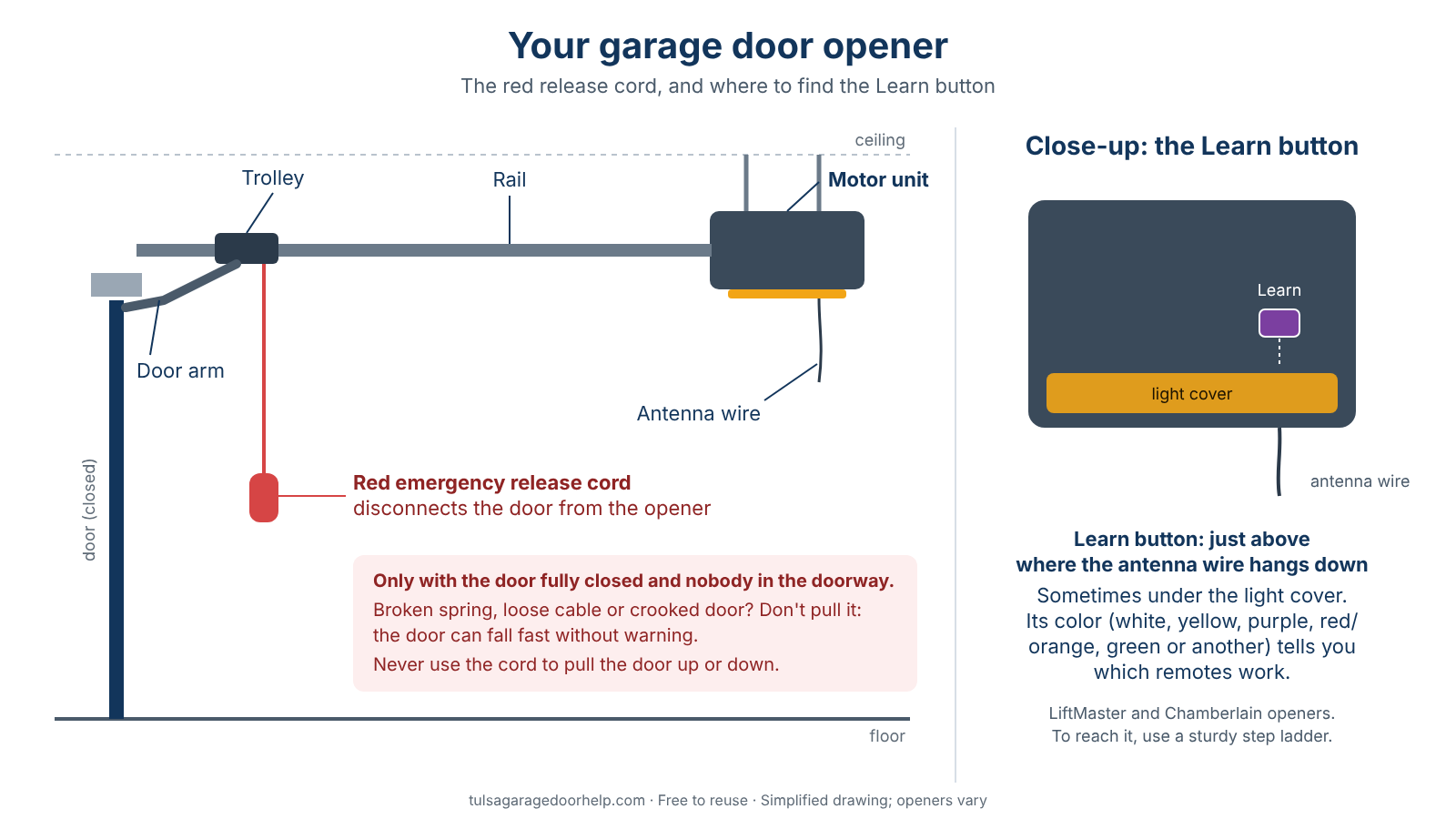
Diagram: Your garage door opener: the red release cord and the Learn button

Labeled diagram in two parts. First, a side view of a ceiling-mounted garage door opener with the motor unit, rail, trolley and door arm, and the red emergency release cord hanging from the trolley, with a warning to pull it only with the door fully closed and nobody in the doorway, and never with a broken spring, a loose cable or a crooked door. Second, a close-up of the motor unit showing the Learn button just above where the antenna wire hangs down, sometimes under the light cover.Labeled diagram in two parts. First, a side view of a ceiling-mounted garage door opener with the motor unit, rail, trolley and door arm, and the red emergency release cord hanging from the trolley, with a warning to pull it only with the door fully closed and nobody in the doorway, and never with a broken spring, a loose cable or a crooked door. Second, a close-up of the motor unit showing the Learn button just above where the antenna wire hangs down, sometimes under the light cover.
Pull the red cord only with the door fully closed and nobody in the doorway, and not at all if a spring or cable is broken or the door is crooked (these are our rules; LiftMaster and Chamberlain say to use it with the door closed whenever possible). On LiftMaster and Chamberlain openers the Learn button is just above the antenna wire. Genie and other brands work differently. Sources: Chamberlain Group support: How to manually open or close a garage door; Chamberlain Group support: How to find the Learn button. Free to reuse; please credit us: how to use our diagrams.

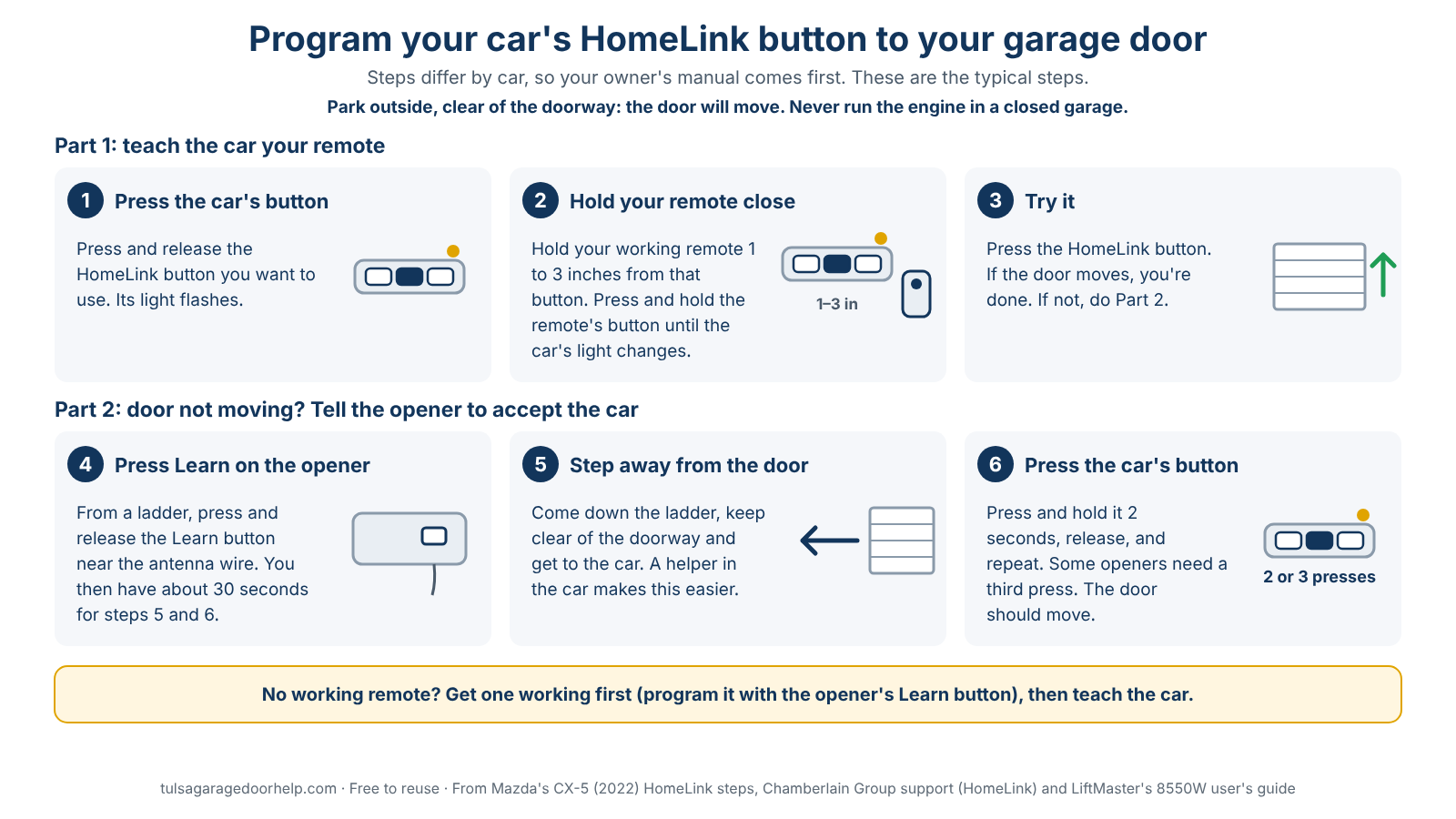
Diagram: Program your car's HomeLink button to your garage door

Steps to program a car's HomeLink button to a garage door opener. Park outside, clear of the doorway: the door will move. Never run the engine in a closed garage. Part 1: teach the car your remote: 1: Press the car's button. Press and release the HomeLink button you want to use. Its light flashes. 2: Hold your remote close. Hold your working remote 1 to 3 inches from that button. Press and hold the remote's button until the car's light changes. 3: Try it. Press the HomeLink button. If the door moves, you're done. If not, do Part 2. Part 2: door not moving? Tell the opener to accept the car: 4: Press Learn on the opener. From a ladder, press and release the Learn button near the antenna wire. You then have about 30 seconds for steps 5 and 6. 5: Step away from the door. Come down the ladder, keep clear of the doorway and get to the car. A helper in the car makes this easier. 6: Press the car's button. Press and hold it 2 seconds, release, and repeat. Some openers need a third press. The door should move. No working remote? Get one working first (program it with the opener's Learn button), then teach the car. Steps differ by car, so your owner's manual comes first. These are the typical steps.Steps to program a car's HomeLink button to a garage door opener. Park outside, clear of the doorway: the door will move. Never run the engine in a closed garage. Part 1: teach the car your remote: 1: Press the car's button. Press and release the HomeLink button you want to use. Its light flashes. 2: Hold your remote close. Hold your working remote 1 to 3 inches from that button. Press and hold the remote's button until the car's light changes. 3: Try it. Press the HomeLink button. If the door moves, you're done. If not, do Part 2. Part 2: door not moving? Tell the opener to accept the car: 4: Press Learn on the opener. From a ladder, press and release the Learn button near the antenna wire. You then have about 30 seconds for steps 5 and 6. 5: Step away from the door. Come down the ladder, keep clear of the doorway and get to the car. A helper in the car makes this easier. 6: Press the car's button. Press and hold it 2 seconds, release, and repeat. Some openers need a third press. The door should move. No working remote? Get one working first (program it with the opener's Learn button), then teach the car. Steps differ by car, so your owner's manual comes first. These are the typical steps.
Typical steps from Mazda's HomeLink instructions, Chamberlain Group support and LiftMaster's 8550W user's guide. Steps differ by car and opener: your car's owner's manual comes first. Simplified drawing. Sources: Mazda CX-5 (2022) owner's manual: Programming the HomeLink system; Chamberlain Group support: how to program HomeLink to a Chamberlain or LiftMaster garage door opener (read Nov 16, 2026); LiftMaster 8550W/8557W user's guide 114A5013, 2017 (FCC copy). Free to reuse; please credit us: how to use our diagrams.
Straight answers

Who will answer

Tulsa Garage Door Help is a garage door guide and price site, not a repair company. We're signing up one insured, registered local garage door company that will agree in writing to the promises on this page. We check its insurance certificate and its Oklahoma business registration ourselves, and we'll show you what we checked and when. Until it's confirmed, we're not taking repair requests. The free second opinion on a quote, by text, is open now.

Once that company is confirmed, repair requests will go to that one company at a time, never to a list, and we'll tell you its name before it comes out. If it can't help, we'll ask you before passing your request to anyone else.