What a battery backup does
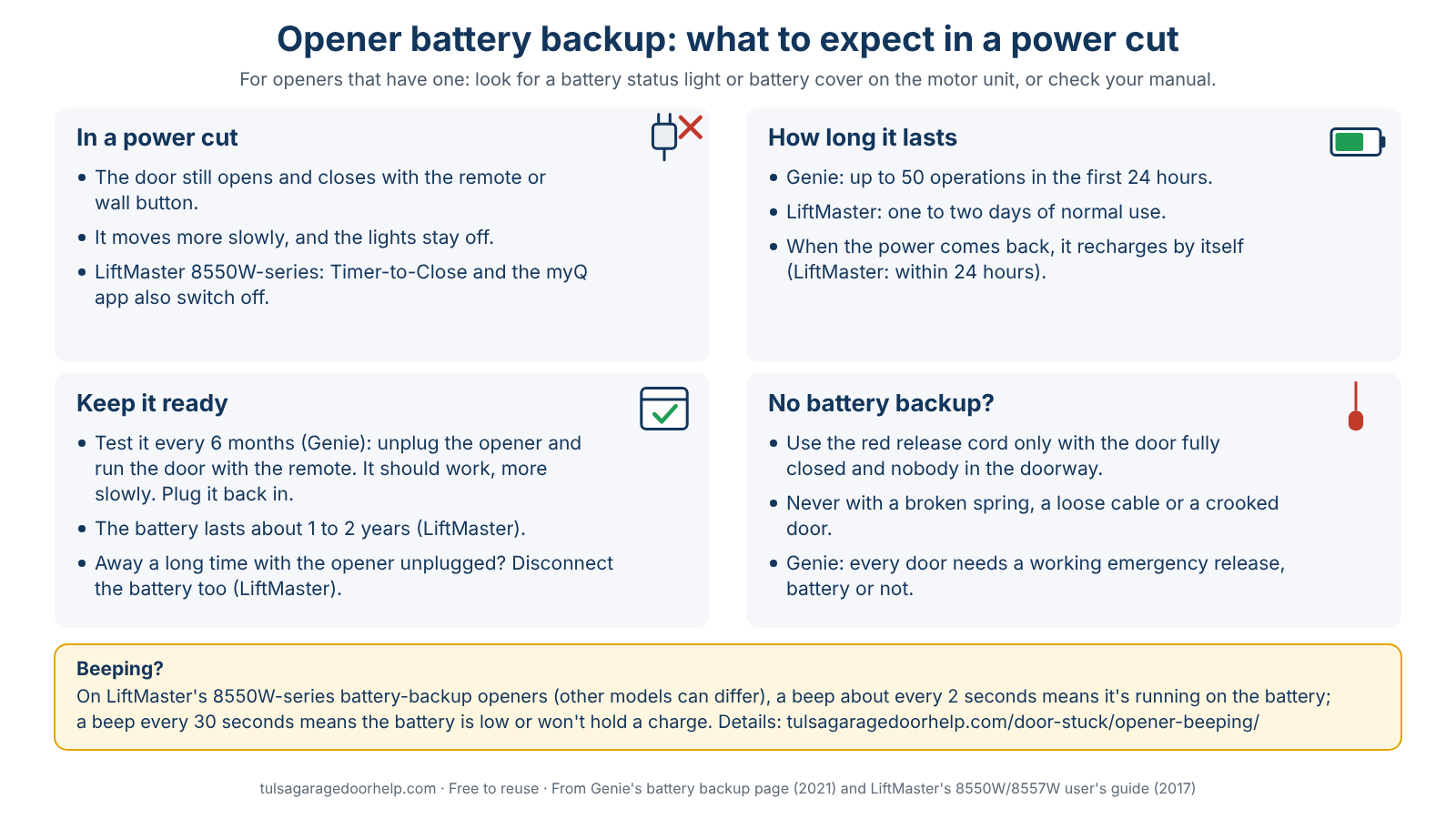
- When the power goes out, the battery takes over, so you can still open and close the door with the remote or wall button (Genie: battery backup options (2021))
- To save the battery, the door moves more slowly and the opener's lights stay off (Genie: battery backup options (2021); LiftMaster 8550W/8557W user's guide 114A5013, 2017 (FCC copy))
- How long it lasts: Genie says up to 50 operations in the first 24 hours; LiftMaster's guide says one to two days of normal use (Genie: battery backup options (2021); LiftMaster 8550W/8557W user's guide 114A5013, 2017 (FCC copy))
- When the power comes back, the battery recharges by itself. LiftMaster: within 24 hours (LiftMaster 8550W/8557W user's guide 114A5013, 2017 (FCC copy))
On battery, some extras switch off. On the LiftMaster models in its guide, that's the lights, Timer-to-Close and the myQ app (LiftMaster 8550W/8557W user's guide 114A5013, 2017 (FCC copy)).
Does my opener have one?
Not every opener does. Look on the motor unit for a battery status light or a battery cover, or check your model's manual. California has required a battery backup on openers sold or installed there since July 1, 2019 (California SB 969 (2018)); elsewhere it depends on the model. Some openers can take an add-on battery kit; Genie sells one for certain models (Genie: battery backup options (2021)).
Why is my garage door opener beeping?
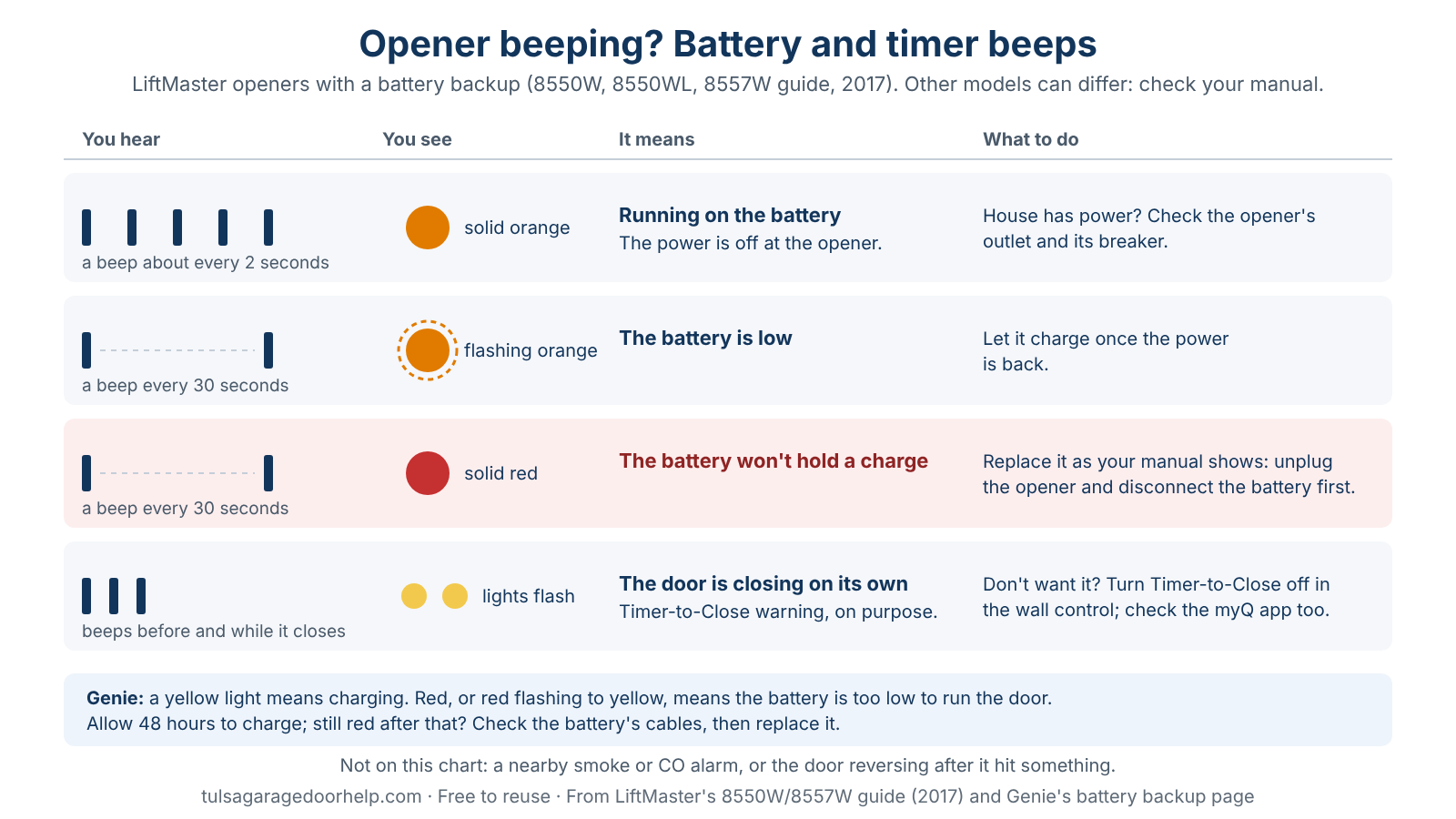
On LiftMaster openers with a battery backup, the beeps and the battery light tell you what's going on. These are from LiftMaster's 2017 user's guide for its 8550W, 8550WL and 8557W openers (LiftMaster 8550W/8557W user's guide 114A5013, 2017 (FCC copy)); other models can differ, so check your manual.
| What you hear and see | What it means | What to do |
|---|---|---|
| A beep about every 2 seconds, solid orange light | The opener is running on its battery | The power is off at the opener. If the rest of the house has power, check the outlet the opener plugs into and its breaker |
| A beep every 30 seconds, flashing orange light | The battery is low | Let it charge once the power's back |
| A beep every 30 seconds, solid red light | The battery won't hold a charge any more | Replace the battery (below) |
| Lights flash and it beeps just before and while the door closes by itself | The warning before Timer-to-Close shuts an unattended door | Nothing if you want it: that's on purpose. If you don't, turn Timer-to-Close off in the wall control's menu, and check the myQ app for a schedule that closes the door. LiftMaster says not to use Timer-to-Close on a one-piece door |
Genie: a yellow light means charging; red, or red flashing to yellow, means the battery is too low to run the door. Allow 48 hours to charge. Still red after that? Check the battery's cables, then replace it (Genie: battery backup options (2021)).
How to change the backup battery (LiftMaster example)
LiftMaster's guide says a battery lasts about 1 to 2 years with normal use (LiftMaster 8550W/8557W user's guide 114A5013, 2017 (FCC copy)). Battery life varies by model, so check your opener's manual too. These steps are from that guide; the cover and battery may sit differently on your model.
- Wear gloves and eye protection, and use a sturdy step ladder.
- Unplug the opener. LiftMaster: disconnect all electric and battery power before any service (LiftMaster 8550W/8557W user's guide 114A5013, 2017 (FCC copy)).
- Open the light lens on the right side of the motor unit (on these models) and take off the battery cover with a Phillips screwdriver.
- Disconnect the red and black wires from the old battery and slide it out. Until you do, the opener still has power from it.
- Slide the new battery partly in, terminals facing out. Connect the red wire to the + terminal and the black wire to the − terminal.
- Put the cover back and plug the opener in. The battery light should flash green while it charges.
Use the replacement battery your manual names (for these LiftMaster models it's part 485LM). Never put the old one in a fire: it can explode. Dispose of or recycle it according to local rules (LiftMaster 8550W/8557W user's guide 114A5013, 2017 (FCC copy)).
Test it twice a year
Genie suggests testing every 6 months (Genie: battery backup options (2021)):
- Unplug the opener (or switch off its breaker).
- Open and close the door with the remote or wall button. It should work, more slowly.
- Plug it back in.
Going away for a long time with the opener unplugged? LiftMaster says to disconnect the battery too, so it lasts longer (LiftMaster 8550W/8557W user's guide 114A5013, 2017 (FCC copy)).
No battery backup? Power outage options
- Open the door by hand with the red release cord, only if the door is fully closed and nobody is in the doorway, and never with a broken spring, loose cable or crooked door: how to open a garage door without power
- Think about an add-on battery kit if your opener takes one, or a battery-backup opener when it's due for replacing (Genie: battery backup options (2021))
- The red emergency release still matters with a battery backup: Genie says every door needs a working one (Genie: battery backup options (2021))
Getting a repair quote? Compare it with typical prices, with their sources, or put it into the free quote checker.