Find your code
Look at the motor unit on the ceiling. Chamberlain uses two kinds of code, and says to go by which light is flashing (Chamberlain Group support: diagnostic codes for garage door openers (which openers use which code)):
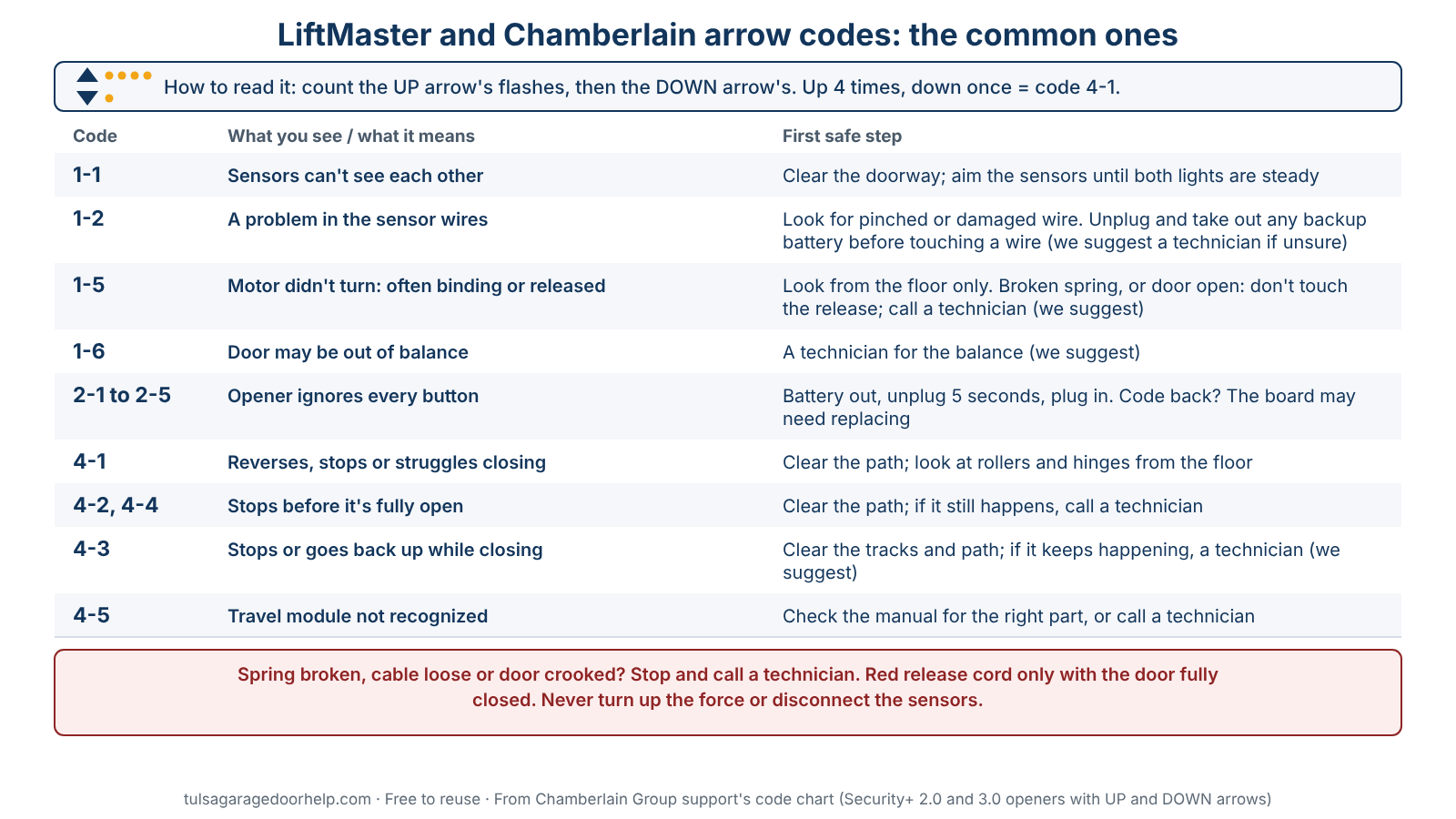
- The UP and DOWN arrows are flashing. They flash a number of times each: the UP count first, then the DOWN count. Write it down as two numbers, like 4-1. Use the first table, then more codes if yours isn't there
- The small light next to the Learn button is flashing. It blinks a number of times, pauses, then repeats. Use the Learn-button table
- A light on one of the sensors near the floor is blinking or off. See the sensors' own lights
Count it twice to be sure. Find the model number too: Chamberlain says the label is on the side or back of the motor unit (Chamberlain Group support: garage door opener diagnostic codes (Security+ 2.0 and 3.0, UP and DOWN arrows)). You'll need it if your code isn't here.
Before you try anything
- Stop using the door and call a technician if a spring looks broken, a cable hangs loose or the door is crooked. Don't run it, even to close it. Chamberlain says not to adjust springs, cables, pulleys or brackets yourself (Chamberlain Group support: garage door opener diagnostic codes (Security+ 2.0 and 3.0, UP and DOWN arrows))
- Pull the red release cord only with the door fully closed, and never with a broken spring, a loose cable or a crooked door. Chamberlain warns that a weak or broken spring can let the door drop (Chamberlain Group support: garage door opener diagnostic codes (Security+ 2.0 and 3.0, UP and DOWN arrows))
- Never tape over, unplug or disconnect the safety sensors (the two small boxes near the floor, one each side of the door). Re-aiming them, where a code says to, is fine
- Never turn up the force setting (how hard the opener pushes) to get past a code
UP and DOWN arrow codes
What each code means, and the first thing to try, are from Chamberlain's own code chart (Chamberlain Group support: garage door opener diagnostic codes (Security+ 2.0 and 3.0, UP and DOWN arrows)). Where a row says "we suggest", that's our advice.
| Code | What you see | What it means, and what's safe to try |
|---|---|---|
| 1-1 | Door starts to close, then goes back up | The sensors can't see each other: something is in the way, they're out of line, or a sensor wire is loose or broken. Clear the doorway, then aim the sensors at each other until both lights are steady. Fix the sensors |
| 1-2 | Door won't close, or moves an inch or two and goes back | A problem in the sensor wires. Chamberlain says to check that the wire colors match at both ends, and to look for pinched or damaged wire. Look first; unplug the opener and take out any backup battery before touching any wire at the motor unit. We suggest a technician if you're not comfortable with wiring |
| 1-5 | Opener hums or clicks; the door barely moves | The motor didn't turn when asked: often something is binding, or the red release was pulled. Chamberlain says to check for binding, such as a broken spring (Chamberlain Group support: diagnostic codes, Wi-Fi residential and light-duty commercial jackshaft operators (8500W, LJ8900W, LJ8950W)). We suggest looking from the floor only: if a spring looks broken, or the door is open, don't touch the release and call a technician. If the springs look fine and the door is closed, reconnect the release without lifting the door by hand (see reconnecting the opener) |
| 1-6 | Door drifts down after opening | Chamberlain says the door may be out of balance (the springs no longer carry its weight properly), or it was moved by hand and the red release was pulled. We suggest a technician for the balance; if the door is closed and the springs look fine, the release can be reconnected without lifting the door by hand (see reconnecting the opener) |
| 2-1 to 2-5 | Opener ignores every button | Take out any backup battery, unplug the opener for 5 seconds and plug it back in. If the code comes back, the opener's main circuit board may need replacing |
| 4-1 | Door reverses, stops or struggles while closing | Clear the path, and look at the rollers and hinges from the floor. We suggest: if the door touches the floor and keeps pushing, reset the travel limits (see our travel limits guide). If you can't find what's stopping it, call a technician |
| 4-2, 4-4 | Door stops before it's fully open | Something is holding the door back, or it's out of balance. Clear the path; if it still happens, call a technician |
| 4-3 | Door stops or goes back up while closing | Chamberlain says to look along the door's path and tracks, clear anything in the way, and check the rollers and hinges. If it keeps happening, Chamberlain says a part inside the opener may need checking. We suggest a technician for that |
| 4-5 | Door goes back up or won't move | The opener doesn't recognize the part that tracks the door's position (Chamberlain calls it the travel module), often after that part was swapped. Check the manual for the right part, or call a technician |
Two codes only appear on some openers that mount on the wall beside the door instead of on the ceiling (Chamberlain calls them jackshaft openers), such as Chamberlain's 8500W (Chamberlain Group support: diagnostic codes, Wi-Fi residential and light-duty commercial jackshaft operators (8500W, LJ8900W, LJ8950W)):
- 3-5: the opener senses a cable problem. Look from the floor. If a cable is loose, stop using the door and call a technician (Chamberlain Group support: garage door opener diagnostic codes (Security+ 2.0 and 3.0, UP and DOWN arrows))
- 5-5: on the 8500W and similar, Chamberlain says the app, schedules or automatic close need its myQ remote light plugged in and programmed, or you can turn off schedules and automations in the myQ app (Chamberlain Group support: garage door opener diagnostic codes (Security+ 2.0 and 3.0, UP and DOWN arrows)). On the light-duty commercial LJ8900W and LJ8950W, Chamberlain says the fix is a new main circuit board (Chamberlain Group support: diagnostic codes, Wi-Fi residential and light-duty commercial jackshaft operators (8500W, LJ8900W, LJ8950W)). We suggest a technician for that
More codes in some LiftMaster manuals
Chamberlain says some models have codes that aren't on its general chart, and that the owner's manual has the full list (Chamberlain Group support: garage door opener diagnostic codes (Security+ 2.0 and 3.0, UP and DOWN arrows)). For example, the manual for LiftMaster's Smart LED openers 87504-267, 84501, 87802 and 84602 lists these (LiftMaster 87504-267/84501/87802/84602 owner's manual, diagnostic chart, pages 43-44). Chamberlain files this manual under openers made before 2022. Where a row says "we suggest", that's our advice.
| Code | What you see | What it means, and what's safe to try |
|---|---|---|
| 1-3 | The wall control panel doesn't work | The control panel's wires are shorted or the panel is faulty. Look along its wire for staples or damage. We suggest a technician for anything at the motor unit |
| 1-4 | Door won't close and the lights flash | The sensors are out of line or something briefly blocked them. Re-aim them until both lights are steady, and make sure nothing hanging on the door crosses the beam as it closes |
| 1-5 | A single click and no movement, or the opener hums for 1-2 seconds | The manual says to check for binding, such as a broken spring, and that a logic board (after a single click) or the motor (after a hum) may need replacing. We suggest looking from the floor only, and a technician for the rest |
| 3-2 | The travel can't be set, or won't hold | A problem with the travel module (the part that tracks the door's position). A technician job |
| 3-3 | The battery light is still flashing green after a day plugged in | The battery backup's charging circuit has failed; the manual says the logic board needs replacing. A technician job |
| 4-6 | Door won't close and the lights flash | The sensors are out of line or something briefly blocked them. Re-aim them so both lights are steady, not flickering |
Codes differ between models and years, so if your manual's chart says something different, go by your manual.
The sensors' own lights (amber and green)
The two safety sensors near the floor each have a light. The one with the amber (orange) light sends the beam; the one with the green light receives it (Chamberlain Group support: garage door opener diagnostic codes (Security+ 2.0 and 3.0, UP and DOWN arrows)).
- Both lights steady: the sensors are lined up and working
- Green light blinking: the sensors are blocked or out of line. Clear the beam, loosen the wing nut, aim the sensors at each other until the green light stays steady, then tighten it (Chamberlain Group support: garage door opener diagnostic codes (Security+ 2.0 and 3.0, UP and DOWN arrows); LiftMaster 87504-267/84501/87802/84602 owner's manual, sensors, page 29)
- Green light off, amber light on: Chamberlain's support page says this usually means the sensors are out of line (Chamberlain Group support: garage door opener diagnostic codes (Security+ 2.0 and 3.0, UP and DOWN arrows)); its manual for the models above says a sensor light that's off means no power to that sensor (LiftMaster 87504-267/84501/87802/84602 owner's manual, sensors, page 29). Re-aim first; if the green light stays off, look along the green sensor's wire for a break
- Both lights off, or the amber light off: no power to the sensors. Check the opener has power, and look along the sensor wires for a break or a short (Chamberlain Group support: garage door opener diagnostic codes (Security+ 2.0 and 3.0, UP and DOWN arrows); LiftMaster 87504-267/84501/87802/84602 owner's manual, sensors, page 29)
- Low sun shining on the green sensor? LiftMaster's manual says to swap the two sensors so the receiving (green) one isn't in direct sunlight (LiftMaster 87504-267/84501/87802/84602 owner's manual, sensors, page 29). Our sun glare tool shows when the sun lines up with your garage
More help: fixing garage door sensors.
Battery backup light
On the LiftMaster models above with a battery backup, the manual says the battery light glows solid orange when the opener is running on the battery, flashes when the battery is low, and flashes green while the battery charges; a full charge takes 24 hours (LiftMaster 87504-267/84501/87802/84602 owner's manual, battery backup, page 32). A battery light still flashing green after a day plugged in is code 3-3 above. Beeping and power cuts: opener battery backup.
The light next to the Learn button
What each count means is from Chamberlain (Chamberlain Group support: what does the flashing LED next to the Learn button mean?). Where a row says "we suggest", that's our advice.
| Blinks | What it means | What's safe to try |
|---|---|---|
| 1 blink | A sensor wire is broken or disconnected | Look along the sensor wires for a break or a loose end |
| 2 blinks | A sensor wire is shorted or the wires are swapped | Chamberlain says to check the wires are on the right terminals, at the motor unit and at the sensors: white to terminal 2, white with a black stripe to 3. Unplug the opener and take out any backup battery before you touch the wires at the motor unit. We suggest a technician if you're not comfortable with wiring |
| 3 blinks | A problem with the wall button or its wires | Look for a staple through the wire. We suggest a technician to test it |
| 4 blinks | Sensors out of line: one sensor's light is dim or flashing | Clean the lenses and aim the sensors at each other until both lights are steady |
| 5 blinks | The motor didn't turn when asked | If the opener otherwise runs normally, unplug it for 5 seconds to reset (take out any backup battery too, or it won't reset). If it has been running a lot, let it cool: Chamberlain's owner's manuals say 15 or 30 minutes depending on the model (its support article says 45), so check your manual. If it hums and stops, look from the floor for a broken spring, and leave it to a technician |
| 6 blinks | The motor's circuit has failed | Chamberlain says the opener's main circuit board needs replacing. We suggest a technician |
Chamberlain says openers and replacement boards made after 2022 no longer flash the opener's own lights 10 times for a sensor problem. Check the lights on the sensors instead (Chamberlain Group support: what does the flashing LED next to the Learn button mean?).
Unplugging safely
Before you unplug, close the door with the wall button if it closes normally and no spring or cable looks wrong. If the door is stuck open, or a spring or cable looks wrong, leave it where it is, keep everyone out from under it, and call a technician.
When to call a technician
- The code comes back after one reset
- The code points to the door itself: sticking, out of balance, springs or cables
- Any code, if the door is heavy, crooked or noisy
Codes vary by model. If yours isn't here, Chamberlain says your owner's manual has the chart for your model (Chamberlain Group support: garage door opener diagnostic codes (Security+ 2.0 and 3.0, UP and DOWN arrows)). Not sure what the door is doing? Try the door checker.
Getting a repair quote? Compare it with typical prices, with their sources, or put it into the free quote checker.
Sources
- Chamberlain Group support: garage door opener diagnostic codes (Security+ 2.0 and 3.0, UP and DOWN arrows)
- Chamberlain Group support: diagnostic codes for garage door openers (which openers use which code)
- Chamberlain Group support: what does the flashing LED next to the Learn button mean?
- Chamberlain Group support: diagnostic codes, Wi-Fi residential and light-duty commercial jackshaft operators (8500W, LJ8900W, LJ8950W)
- LiftMaster 87504-267/84501/87802/84602 owner's manual, diagnostic chart, pages 43-44
- LiftMaster 87504-267/84501/87802/84602 owner's manual, sensors, page 29
- LiftMaster 87504-267/84501/87802/84602 owner's manual, battery backup, page 32