Find your code
Look at the motor unit on the ceiling (or on the wall beside the door, on a wall-mount opener), and find the model number on its label. Genie openers use one of three kinds of light code:
- Two lights, one round and one long, lit in red, blue, purple, green, yellow or white. Most Genie openers sold in recent years. Write down which light is lit, its color, and whether it's steady or flashing. Use the two-light tables
- A red light and a green light that blink a count, pause, then repeat. Older models such as the 1022, 1024 and 1042, and the 2022, 2024 and 2042. Use the red and green table
- One light that blinks a count. Genie's older Excelerator openers. Use the Excelerator table
The two safety sensors near the floor have lights of their own, with their own meanings: see the sensors' own lights.
Before you try anything
- Stop using the door if a spring looks broken, a cable hangs loose or the door is crooked. Don't run it, even to close it. Genie's manual says never to try to repair door hardware or springs yourself, and to hire a door service professional (Genie belt and chain drive opener manual (Oct 2024), troubleshooting, printed page 23)
- Never cover, unplug or disconnect the safety sensors (the two small boxes near the floor, one each side of the door; Genie calls them Safe-T-Beams). Re-aiming them is fine. Genie says the door won't close unless they're working (Genie: Excelerator series self-diagnostic troubleshooting)
- Never turn up the force setting (how hard the opener pushes) to get past a code
Two lights: round and long
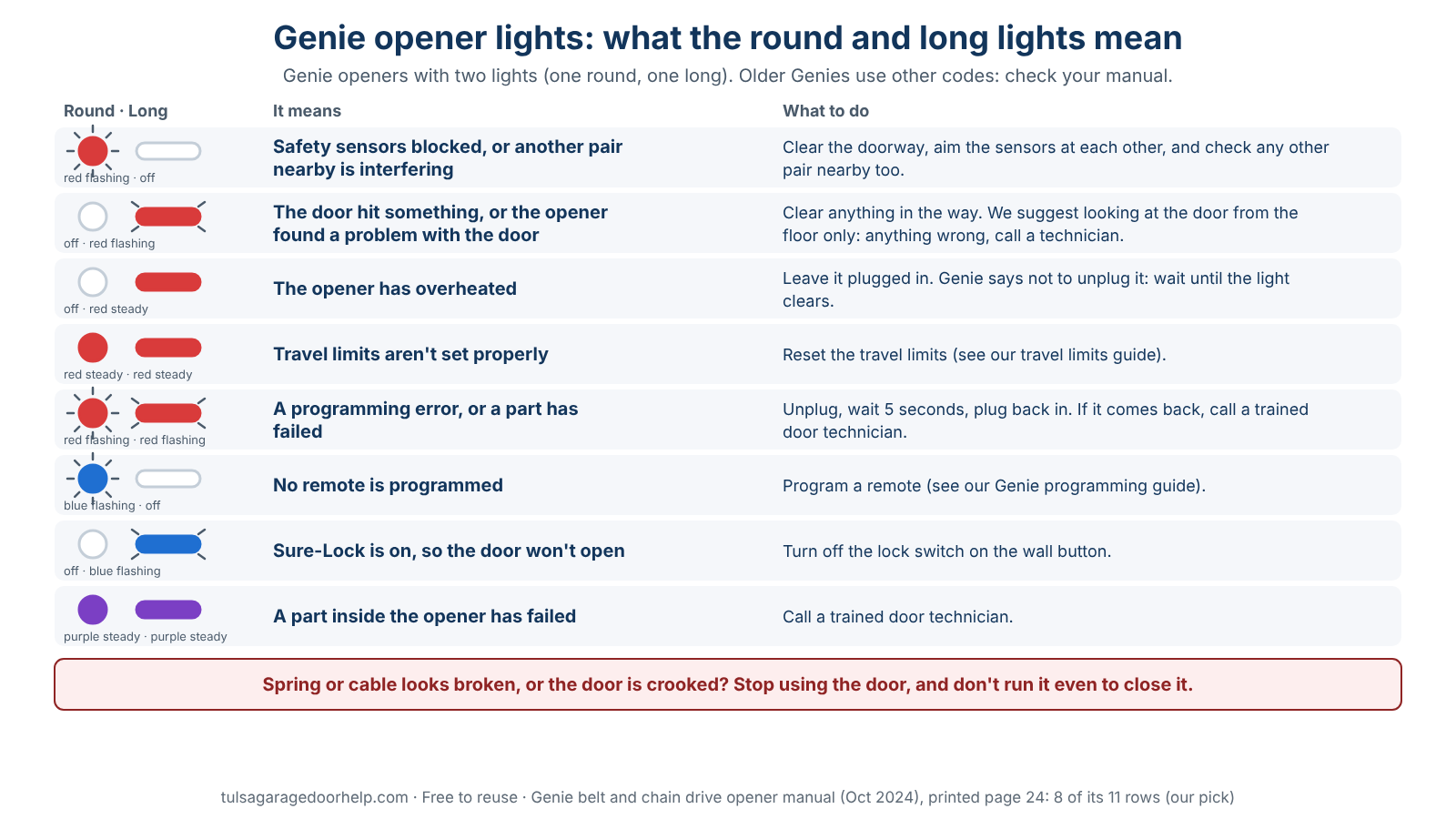
This chart is from Genie's 2024 manual for its belt and chain drive openers with two lights (Genie belt and chain drive opener manual (Oct 2024), printed page 24). Genie's parts guide lists the ChainMax 1000 (model 3022), SilentMax 1000 (3042), ChainMax 1200 (4022), SilentMax 1200 (4042) and the IntelliG 3024H, 3124H and 4124H among its two-light chain and belt openers (Genie residential parts guide, page 8). The manual itself doesn't list model numbers, so matching it to these models is our reading of the two documents; your own model's manual is the final word. The same chart is in Genie's IntelliG 3024 manual (Genie IntelliG 3024 owner's manual, troubleshooting chart, manual page 25 (manualsdir.com copy)) and its wall-mount opener manual (Genie wall-mount opener manual, printed page 28). Where a row says "we suggest", that's our advice.
| Lights | What it means | What's safe to try |
|---|---|---|
| Round: off Long: off | Normal, or no power if nothing works | If nothing works, check the opener has power. If it still doesn't respond, Genie says to contact a trained door technician |
| Round: red, steady Long: red, steady | The travel limits (where the opener stops the door at the top and bottom) aren't set properly | Reset the limits (see our travel limits guide) |
| Round: red, flashing Long: red, flashing | A programming error, or a part has failed | Unplug, wait 5 seconds, plug back in. If it comes back, Genie says to contact a trained door technician |
| Round: blue, flashing Long: off | No remote is programmed | Program a remote (see our guide to programming a Genie opener) |
| Round: purple, flashing Long: off | No remote is programmed | Program a remote as your manual shows. Genie's IntelliG 3024 manual says this one means an older IntelliCode 1 remote isn't programmed (Genie IntelliG 3024 owner's manual, troubleshooting chart, manual page 25 (manualsdir.com copy)) |
| Round: red, flashing Long: off | Something is blocking the safety sensors, or another pair nearby is interfering | Clear the doorway, then check the sensors are aimed at each other, and at the nearest other pair if you have more than one door (see the sensors' own lights) |
| Round: off Long: red, flashing | The door hit something going up or down, or the opener detected a problem with the door | Clear anything in the way. Genie says to check the door spring, track, rollers, hinges and fixtures. We suggest looking from the floor only: anything wrong, call a technician |
| Round: off Long: red, steady | The opener has overheated (thermal cutout) | Leave it plugged in. Genie says not to unplug it, and to wait until the light clears before using the door |
| Round: purple, steady Long: purple, steady | A part inside the opener has failed | Genie says to contact a trained door technician |
| Round: off Long: blue, flashing | The door won't open because Sure-Lock is on | Turn off Sure-Lock (the lock switch on the wall button). It should be off for normal use |
| Round: purple, flashing Long: purple, flashing | A problem with the opener's radio receiver | Unplug, wait 5 seconds, plug back in. If it comes back, Genie says to contact a trained door technician |
On Genie's wall-mount openers, both lights flashing yellow in turn means the interlock is open: Genie says to check for a missing wire at the interlock terminal and to inspect the interlock (Genie wall-mount opener manual, printed page 28). We suggest a technician for that.
SilentMax or ChainMax with a flashing red light?
If yours has the two lights (round and long), look at which one is flashing red, using the chart above (Genie belt and chain drive opener manual (Oct 2024), printed page 24). Check it against the chart in your own manual:
- Only the round light: the safety sensors. Clear the doorway and re-aim them
- Only the long light: the door hit something, or the opener detected a problem with the door. Clear the path, then look at the springs, tracks, rollers and hinges from the floor
- Both lights: a programming error or a failed part. Unplug for 5 seconds; if it comes back, call a technician
- The long light red and steady, not flashing: it has overheated. Leave it plugged in and wait
Battery backup lights
On a Genie opener with a battery backup, both lights show the battery's state (Genie belt and chain drive opener manual (Oct 2024), printed page 24; Genie wall-mount opener manual, printed page 28). Genie's 2024 manual says both lights steady green is normal on these models; on models without a battery, both lights are off.
| Both lights | What it means | What to do |
|---|---|---|
| Green, steady | Battery charged; normal | Nothing |
| Green, flashing | The power is out and the opener is running on the battery | Nothing; the battery is in use |
| Yellow, flashing | The battery is charging | Nothing |
| Red to yellow, flashing | The battery is dead | Genie's 2024 manual says to let it charge for 48 hours and replace it if it won't charge; its wall-mount manual says to replace it |
| White, steady | Running on the battery, with the light on as a courtesy light | Nothing; Genie says the light turns off after 4 minutes |
More on the battery and power cuts: opener battery backup.
A red light and a green light that blink a count
These are the charts in Genie's manuals for models 1022, 1024 and 1042 (Genie 1022/1024/1042 manual (2010), page 28) and models 2022, 2024 and 2042 (Genie 2022/2024/2042 manual (2009), page 28). Count the blinks before the pause, and note which light is blinking.
| Light | What it means | What's safe to try |
|---|---|---|
| Both off | Normal | Nothing |
| Red, on steady | Programming isn't finished | Finish programming as your manual shows |
| Red, 1 blink | The remote hasn't been learned | Program the remote |
| Green, 1 blink | The closed position isn't set, or something blocked the sensors or the door on the way down, or the door hit something on the way up | Clear anything in the way. If the close limit was never set, set it. Genie's manuals also say to check the door spring: we suggest looking from the floor only, and calling a technician if anything looks wrong |
| Green, 2 blinks | The open position isn't set, a wire to the motor unit is bad, or the sensors are out of line or blocked | Set the open limit if it was never set, then clear and re-aim the sensors. We suggest a technician for wiring at the motor unit |
| Green, 3 blinks | The limits were set backwards | Genie says to clear the limits and set them again (see our travel limits guide) |
| Green, 4 blinks | The wall button's wire is shorted, or its wires are swapped at the motor unit | Look along the wire for a staple through it. We suggest a technician for anything at the motor unit |
| Green, 5 blinks | The chain or belt is too tight, or the control system has failed. On the 1022, 1024 and 1042 only: it may also be the thermal protector after overheating | On the 1022 family, wait for it to cool: Genie says the 5-blink pattern stays until the next time the opener runs, and to call an authorized dealer if it doesn't reset. For the chain or belt, or a failed control, we suggest a technician |
One light that blinks a count: Excelerator openers
Genie's Excelerator models are the H8000 (and H8000-07, H8000D), ISD990, ISD995, ISD1000, PRO99 (and PRO99-21C, PRO99FN) and CMD9900. What each count means is from Genie (Genie: Excelerator series self-diagnostic troubleshooting). Where Genie's fix means opening the motor unit or changing the force, we suggest a technician.
| Blinks | What it means | What's safe to try |
|---|---|---|
| 1 blink | A problem with the motor's circuit board | Cut the power, wait 5 seconds, restore it, then run the door from the wall button. The first run is slow. If it comes back, a technician should check the door's balance and springs |
| 2 blinks | A problem with the main control board | Same power reset. If it comes back, a technician job |
| 3 blinks | Overheated, or run too many times in a row | Don't unplug it. Wait 10 minutes; Genie says it allows 5 runs per 10-minute rest |
| 4 blinks | The force setting (how hard the opener pushes) is wrong | A technician should check the force and the door |
| 5 blinks | A problem with the safety sensors | Clear the doorway and re-aim the sensors. The door won't close until they work |
| 6 blinks | The wall button isn't working | Look along its wire for a staple or a pinch. We suggest a technician if that's not it |
| 7 blinks | The switches that tell the opener where to stop aren't working | A technician job |
| 8 blinks | The wall button is locked | Slide the vacation lock on the wall button to unlocked |
The sensors' own lights
Each Safe-T-Beam sensor has its own light. The one with the red light sends the beam; the one with the green light receives it. This chart is from Genie's 2024 belt and chain drive manual (Genie belt and chain drive opener manual (Oct 2024), printed page 18); check your own manual if your opener is older.
| Red light | Green light | What it means | What's safe to try |
|---|---|---|---|
| On | On | Normal | Nothing |
| Off | Off | No power to the sensors, or a wiring fault | Check the breaker, fuse and plug. Look along the sensor wires for a short |
| Off | On | The red (sending) sensor's wire is missing or bad, or the power was interrupted | Look along its wire. Unplug the opener and plug it back in |
| 2 blinks | On | The beam is out of line, blocked, or a sensor has failed | Clear the beam and re-aim the sensors. If that doesn't fix it, Genie says to contact its customer support |
| 2 blinks | Off | The wire to the green (receiving) sensor is missing or bad, or the sensor has failed | Look along its wire. If that's not it, Genie says to contact its customer support |
| 3 blinks | On | Interference with the sensor | Find what's interfering, such as sunlight (below). If you can't, Genie says to contact its customer support |
| 4 blinks | On | The red (sending) sensor has failed | Genie says to replace the Safe-T-Beam pair |
Low sun shining into the garage? Genie says direct sunlight on the green sensor can make the opener think something is in the way. Put the red sensor on the sunny side of the door (Genie belt and chain drive opener manual (Oct 2024), printed page 18). Genie also says to use only the Safe-T-Beams that came with the opener. Our sun glare tool shows when the sun lines up with your garage.
Unplugging safely
Never unplug an opener that has overheated (long light red and steady, or 3 blinks on an Excelerator): Genie says to leave the power on (Genie belt and chain drive opener manual (Oct 2024), printed page 24; Genie: Excelerator series self-diagnostic troubleshooting). For any other code, before you unplug, close the door with the wall button if it closes normally and no spring or cable looks wrong. If the door is stuck open, or a spring or cable looks wrong, leave it where it is, keep everyone out from under it, and call a technician.
When to call a technician
- The same code comes back after one reset
- The code points to the door hitting something, a failed part, the force, or the chain or belt
- The door is heavy, crooked or noisy
Your model's chart isn't here? It's in the owner's manual for your model, under troubleshooting. Not sure what the door is doing? Try the door checker.
Getting a repair quote? Compare it with typical prices, with their sources, or put it into the free quote checker.
Sources
- Genie belt and chain drive opener manual (Oct 2024), printed page 24
- Genie belt and chain drive opener manual (Oct 2024), troubleshooting, printed page 23
- Genie belt and chain drive opener manual (Oct 2024), printed page 18
- Genie residential parts guide, page 8
- Genie IntelliG 3024 owner's manual, troubleshooting chart, manual page 25 (manualsdir.com copy)
- Genie wall-mount opener manual, printed page 28
- Genie 1022/1024/1042 manual (2010), page 28
- Genie 2022/2024/2042 manual (2009), page 28
- Genie: Excelerator series self-diagnostic troubleshooting