The myQ app says the garage door opener is offline
The likely cause, a quick check, what's safe to do, and what it usually costs.
Most likely: The router or internet dropped and the opener has not reconnected
Chamberlain's first advice for a unit that worked before is to power cycle opener and router.
You can usually fix this yourself.
Also possible
- The router, Wi-Fi name or password was changed. New router, provider or Wi-Fi password recently? The opener still holds the old details. DIY
- The Wi-Fi signal in the garage is weak or 5 GHz only. Stand under the opener with your phone on home Wi-Fi: is the signal poor? DIY
- The opener or hub has no power. Is the Wi-Fi LED completely dark and the wall button dead as well? DIY
Safe to do now
- Unplug the opener (or hub) for 30 seconds, plug back in, then restart the router.
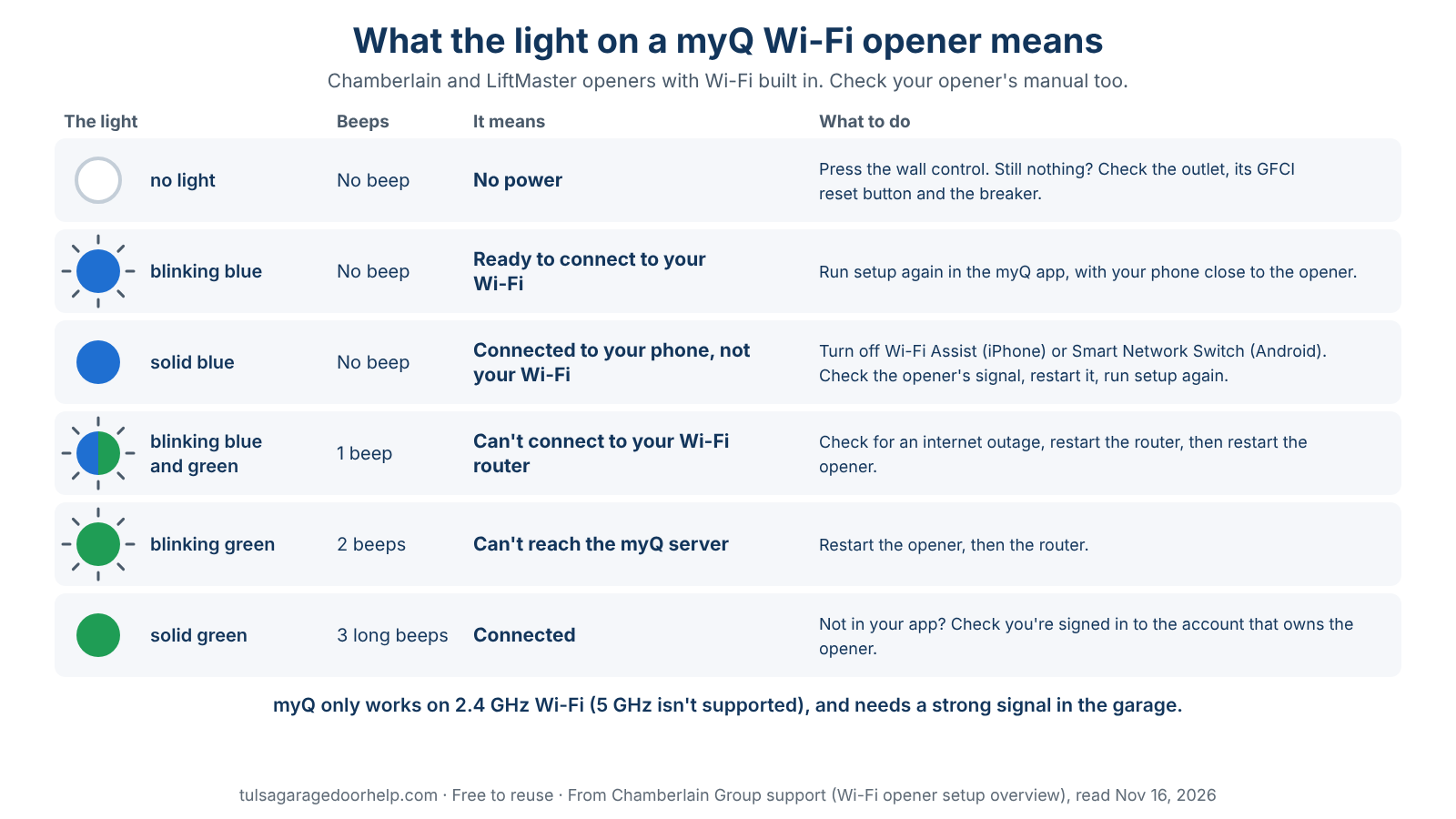
- Look at the Wi-Fi LED on the opener and match its color to Chamberlain's chart.
- After a router or password change, use Update Wi-Fi settings for the device in the myQ app.
- Make sure the router broadcasts a 2.4 GHz network.
Don't
- Do not start with a factory reset; try a power cycle of the opener and router first.
- Do not rely on the app to confirm the door is closed while it shows offline.
Battery backup? An opener with a backup battery can still run the door when it is unplugged. Keep everyone clear of the door and keep the remotes out of reach. Your opener's manual says how to disconnect the battery.
Typical price
If it's the most likely cause: Often free: you can usually sort this yourself.
National figures, not a quote. Every price range and its source.
Step by step: myQ not working? Fixes for the app, Wi-Fi and the door
Where this comes from (3 sources)
- Wi-Fi Garage Door Opener: unable to connect to home Wi-Fi network (overview), Chamberlain Group (LiftMaster, Chamberlain and Craftsman support)
- Unable to Connect a myQ Garage, myQ Smart Garage Hub or Smart Garage Control to Home Wi-Fi Network Overview, Chamberlain Group (LiftMaster, Chamberlain and Craftsman support)
- How to Reconnect to myQ after Replacing the Router or Changing the Router Settings, Chamberlain Group (LiftMaster, Chamberlain and Craftsman support)
We read each source on 10 November 2026. The order of causes follows the makers' own troubleshooting pages where they give one; otherwise it is our judgment, and the page says so.
Not quite it? Describe your problem
Describe it in your own words, like "goes back up" or "remote stopped working".
Related problems
- The app is connected but the door will not open or close from my phone
- The app shows the door open when it is actually closed (or the reverse)
- The Genie Aladdin Connect app says the door is offline
- Alexa or Google will not open or close the garage door any more
- I cannot get the opener or hub connected to Wi-Fi in the first place
- I need to add or remove someone's access in the garage door app
Got a quote that feels high?
Text the amount and what it covers to (918) 205-5200. We compare it with published price data (the sources on our price page), and text you back within a business day. Free, no obligation, and we don't repair doors.
Diagram: What the light on a myQ Wi-Fi garage door opener means