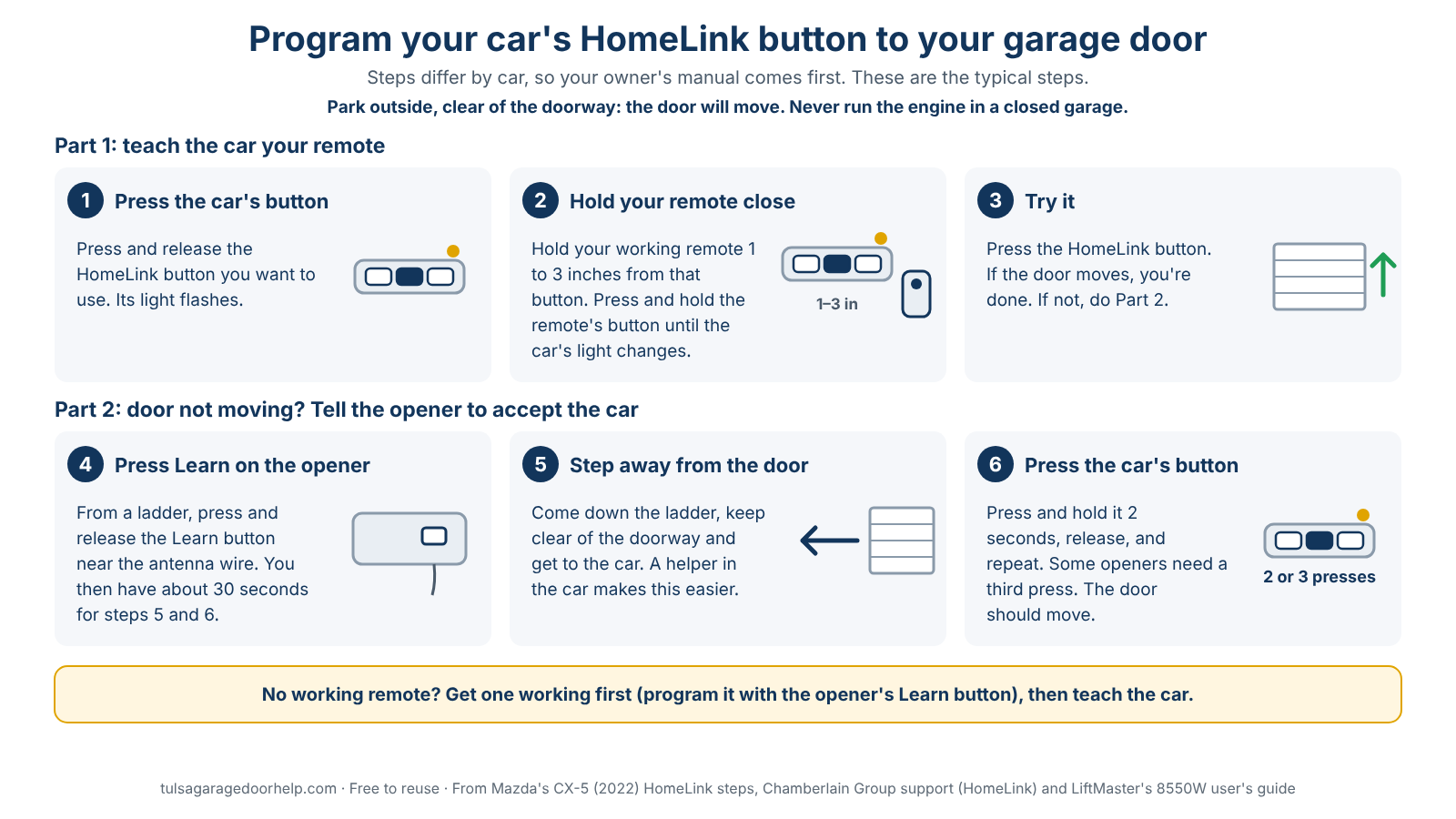
The car's built-in button used to open the garage and has stopped
The likely cause, a quick check, what's safe to do, and what it usually costs.
Most likely: Lock (vacation) mode is on at the wall control
Judgment: lock makes the opener ignore remote commands, and the car button is a remote.
You can usually fix this yourself.
Also possible
- The opener's memory was erased or the opener was replaced. Was the opener replaced, reset or reprogrammed lately? Handheld remotes needed redoing too? DIY
- The new opener needs an add-on kit (a bridge) for this car. Did it stop when a newer opener went in, and the car is some years old? DIY
Safe to do now
- Check the wall control for lock mode first.
- Reprogram the car button, including the learn-button step at the opener.
- Close the door before you climb up to the learn button. Get off the ladder and stand clear before you run the door.
- If the opener is new, check homelink.com for whether a bridge is needed.
Don't
- Do not program the car with people or objects near the door; it will move during the steps.
Typical price
If it's the most likely cause: Often free: you can usually sort this yourself.
If it turns out to be one of the others:
- New remote: typically $30–$40. Source: HomeAdvisor (no date shown).
National figures, not a quote. Every price range and its source.
Step by step: How to program your garage door opener to your car (HomeLink)
Photos that help
If the safe steps don't sort it, these three photos help a shop quote it in writing:
- The back of the remote or keypad (model number)
- The label on the opener (brand and model)
- The colored learn button on the opener, if you can see it from the floor
Take them from where you stand. Don't go under the door, and don't touch the springs, cables or tracks. How to send them.
Where this comes from (4 sources)
- The button on the wall works so why won't my remote control work, Chamberlain Group (LiftMaster, Chamberlain and Craftsman support)
- Garage Door Activates On Its Own, Chamberlain Group (LiftMaster, Chamberlain and Craftsman support)
- How to Program Your Genie Garage Door Opener to HomeLink and Car2U, Genie
- HomeLink Support, HomeLink (Gentex)
We read each source on 10 November 2026. The order of causes follows the makers' own troubleshooting pages where they give one; otherwise it is our judgment, and the page says so.
Not quite it? Describe your problem
Describe it in your own words, like "goes back up" or "remote stopped working".
Related problems
- A remote will not program; the opener never accepts it
- I need a new remote and do not know which one fits my opener
- I want to give a guest, cleaner or contractor temporary access to the garage
- A remote was lost or stolen and I want to make sure it cannot open the door
- The remote got wet, is cracked, or its button or battery cover is broken
- The remote does nothing, but the button on the garage wall still works
Got a quote that feels high?
Text the amount and what it covers to (918) 205-5200. We compare it with published price data (the sources on our price page), and text you back within a business day. Free, no obligation, and we don't repair doors.
Diagram: Program your car's HomeLink button to your garage door